Each packet covers one area: what you are there for, what its lamps and boards are telling you, the routine, the decisions worth making and who notices when you make them. For what any single object is, hold L on it in game. The packet tells you what to do about it.
Procedure SF-110 · Warehouse floor
Warehouse floor
The racks hold 28 numbered bins, and every bin has a lamp that tells you whether the building is about to run out of something. Your job is to decide what gets reordered, fetch what customers ask for, and check that the shelf agrees with the books.
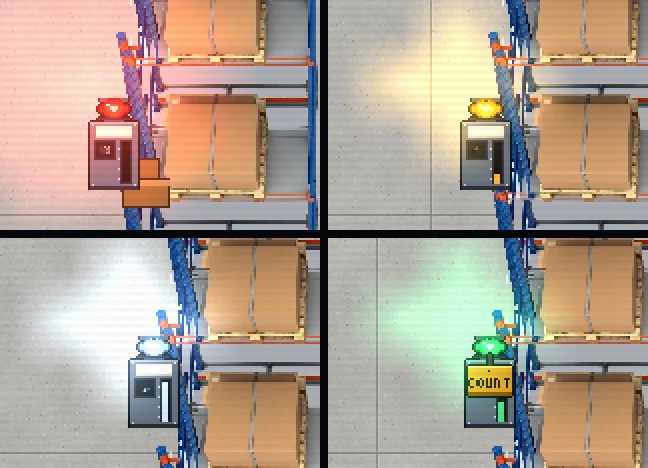
- Empty. Nothing to pick.
- Low, with a reorder open and undecided. This lamp is breathing (Figure 2).
- Full. Nothing more fits.
- OK.
- A COUNT tag: a count is open on this bin.
- The fill bar shows the book, not the shelf.
Readings
The bin plate
Each plate hangs on the aisle face of its rack: the bin number, a picture of the SKU, a fill bar, and a lamp. The lamp says what state the bin is in. It has no text, so here is the text.
| Lamp | What it means | What the building does about it |
|---|---|---|
| Green, steady | OK. Stock is above the reorder line. | Nothing. |
| Amber, steady | Low, and a reorder is on order: pallets are on their way. | Waits for the truck. |
| Amber, breathing | Low, and a reorder is open: nobody has decided it yet. | Mr. Patterson approves it at the suggested size in 60 seconds, unless you decide first. See Decisions. |
| Red | Empty. Nothing to pick, nothing for the crew to ship. | The drivers stop driving. |
| Pale blue | Full. Nothing more fits. | A pallet for this bin will not be put away. |
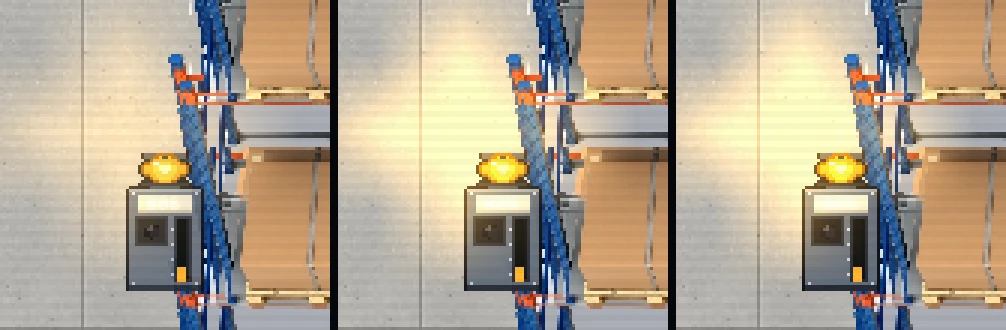
- Breathing, at the bottom of the breath.
- Breathing, at the top. The reorder is open: decide it, or Mr. Patterson will.
- Steady, after APPROVE. The pallets are on order.
A tag hanging off the plate means a count is open on that bin: COUNT for a routine one, COUNT NOW for an urgent one.
Hold L over a plate for its card: Stock, Reorder at, State, Order and Last count. The card tells you what the bin is. This packet tells you what to do about it.
Book and shelf
Every bin has two numbers, and they are not the same number. The book is what the system believes; the fill bar and the plate card show the book. The shelf is what is physically there.
They stay equal until somebody or something moves a unit without the book finding out: a mis-slotted pallet, a damaged unit counted as good, a unit lifted off a pallet, a miscount. Only a cycle count reads the shelf. Nothing else in the game does. That is the whole reason counts exist, and the reason they pay.
The book has never been wrong on purpose. It has simply not been told.
The asset tag
Every carton and pallet carries a tag: serial, SKU, quantity, owner, route, and the custody chain, the last 12 people to touch it. Hold L on a box to read it. The custody chain is how the rest of this packet finds out who did what.
Procedures
SF-111: Get a handheld
- Go to the receiving desk and press E Receiving log.
- Take the labeller it issues. You get one; if you lose it, the desk issues another.
- Use it from your bag. The Logistics Handheld opens with three tabs: Inbox, Picks, Counts.
You must be on the warehouse floor and holding the handheld to decide a reorder, claim an order or claim a count. Otherwise: “Hold the handheld to decide. It is a handheld; it works handheld.”
One per employee, re-issued on loss, as the policy says three times.
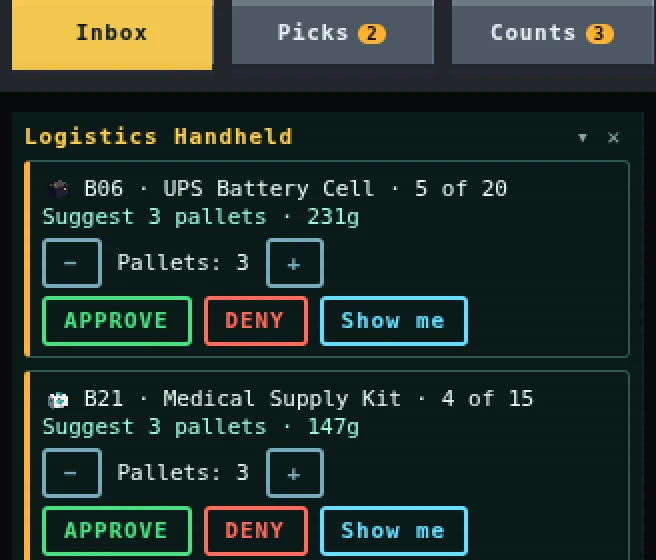
- The reorder: bin, SKU, stock against max, then the suggested pallets and their cost to the ledger.
- The Pallets stepper.
- APPROVE
- DENY
- Show me marks the bin on the floor.
SF-112: Approve a reorder
- Open the handheld on Inbox. Each open reorder shows the bin, the SKU, its stock against its max, and the suggested number of pallets with their cost.
- Press Show me to mark the bin and follow the arrow, if you want to look at it first.
- Set the Pallets stepper. The default is the suggested size: what it takes to reach the bin’s max.
- Press APPROVE.
- The cost comes out of the ledger, not your pocket: 70 per cent of the SKU’s value, per pallet. The row now says it was approved by you.
Refusals you may see: “Already decided by who.” when someone beat you to it, and “That bin takes n pallets at most.” when the stepper is past the limit described in Decisions. When the ledger cannot pay, the refusal says what it has and what the order costs.
SF-113: Deny a reorder
- Open Inbox, find the reorder, press DENY.
- The bin is closed for 10 minutes. If it is still low then, it opens again.
SF-114: Cancel an order
- In Inbox, find the approved row. CANCEL shows while none of that order’s pallets have docked.
- Press it. You get 90 per cent of the cost back into the ledger; the other 10 per cent is a restocking fee, logged under your name.
- You can cancel again after 60 seconds.
Once the truck has docked: “The truck has docked. That order is on the dock now.”
SF-115: Fill a pick order
- Open Picks. Up to 3 orders are open; a new one arrives every 3 minutes while someone is on the floor, and each expires after 15 minutes.
- Press CLAIM on one. You can hold one order. The claim is a lease: 5 minutes plus 2 per line, renewed by each pick.
- The next bin to visit throbs on the rack and a path draws on the floor.
- Walk to within 2 tiles of the bin, hands empty and on foot (not on a forklift), and hold E on the pick prompt. It takes 1 s (0.5 s with Shipping reputation 25 or more).
- You now carry a labelled carton. Take it to the shipping line. The packer is paid as usual; the order’s sale goes to the ledger.
- When every line has shipped, you get 4g and 1 Shipping reputation per line shipped.
If the bin has fewer good units than the line wants, you get what was there and a count opens on the bin. That is correct behaviour: it means the book was wrong.
SF-116: Run a cycle count
- Open Counts. Each task names the bin and the SKU and says Routine or Urgent. Press CLAIM. Your lease is 3 minutes, renewed by each scan. You can count a given bin once per 30 minutes.
- Walk to each slot of the bin and press E on the count prompt. Each scan takes 0.8 s (0.4 s with Shipping reputation 25 or more). Each slot reports what is physically there: good units, damaged units, units that belong in another bin, or nothing.
- When every slot is scanned, the keypad opens, prefilled with the good units you scanned.
- Press SUBMIT and read the result.
| You see | What it means | You get |
|---|---|---|
| “Count OK. The book was right.” | Shelf and book agree. | 3g, 1 rep |
| “Discrepancy found: … The book now agrees with the shelf.” | Your count was true and the book was not. | 8g, 1 rep. The book is corrected, damaged units are written off, and units from another bin go home for 2g each SKU. |
| “Count recorded.” | See Decisions. | Nothing. |
Below the result, Who touched this bin lists the last 8 people to handle it, newest first.
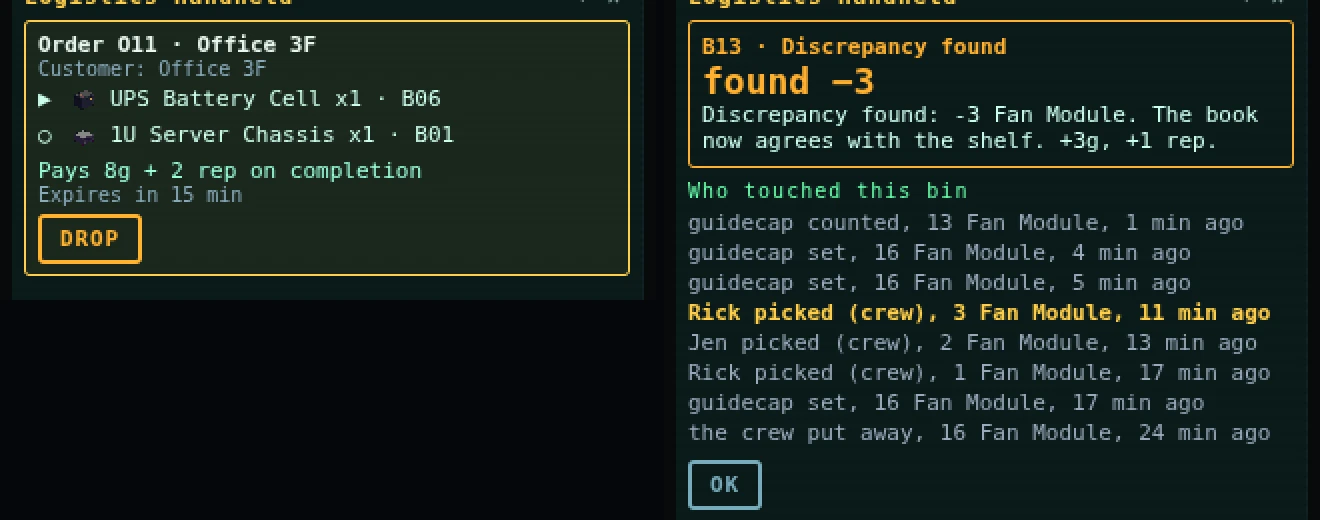
- The line to pick next, and its bin.
- The result line.
- The walk-back. The bold row is the last pick before the count.
Decisions
This is the part that matters. The warehouse is a small economy with a shared ledger, and almost every decision is about whose name ends up on a ledger line.
The breathing lamp: decide it, or let Patterson
A breathing amber lamp is an open reorder with nobody deciding it. You have three choices, and a fourth if you do nothing:
| Choice | What happens | Who pays |
|---|---|---|
| Approve at the suggested size | Pallets ride the next truck and the lamp goes steady. | The ledger, at 70 per cent of value a pallet. Your name is on the line. |
| Approve, resized | Fewer pallets keeps the ledger lean; more, up to 2 past what the bin takes, clogs the dock (below). | The ledger. Your name is on the line. |
| Deny | Nothing is ordered. The bin stays closed for 10 minutes, then opens again if it is still low. | Nobody, until the bin runs dry. |
| Do nothing | After 60 seconds Mr. Patterson approves the suggested size, or what the ledger can cover, whichever is smaller. | The ledger. |
Patterson never over-orders, never denies and never cancels. If the ledger cannot cover anything, the reorder is held and retried at each truck. “I have approved n pallets of sku. This is what the sixty seconds were for.”
Play it well: decide the ones you care about and let Patterson have the rest. Deny only when you mean it: a denied bin is closed whether you were right or not. Decisions pay nothing but the habit; the gold on this floor is in picks and counts.
Over-ordering, on purpose
The stepper lets you order up to 2 pallets more than the bin will take. The extra pallets still dock, still cost the ledger, and cannot be put away. Marco will not force a full bin: “That bin’s full. I’m not forcing it. The last time I forced it, the shelf won.” So those pallets stay on their staging bays, and a truck only brings as many pallets as there are free bays. Hold enough bays and the dock skips a truck entirely.
So it works as a dock clog: other players’ orders queue behind your pallets, and the ledger pays for all of it. It also has your name on it, on the order row and the ledger line, and the decision is announced to every floor player within 24 tiles of the dock or the receiving desk. You cannot clog quietly.
Deny, and what an empty bin costs
Deny a reorder and the bin may run dry. An empty bin means no crew picks from it, the drivers stand idle (“Racks are empty. I’m not driving to an empty shelf. That’s the rule, and also my back.”) and the ledger stops growing from crew sales. Deny is a real tool, for stopping a rival’s over-order or a miscounted bin buying more of what it already has, and it is a real cost.
Cancel wars
Anyone holding a handheld can cancel an order before its pallets dock, including someone else’s. The fee is 10 per cent every time, and the fee line carries your name. A cancel is a good way to undo an over-order and a bad way to win an argument: 3 cancels on one order inside 5 minutes, or two players cancelling each other in turn, brings out Patterson: “Cancelling costs ten per cent. Every time. Please stop treating the restocking fee as a hobby.” The fee goes to the ledger, not to Patterson and not to the other player.
Who gets the pick order
Claim one and nobody else can. If you do not finish, the crew takes it after 4 minutes and nobody is paid, so a claim you will not finish is an order taken from a player who would have. Nothing stops you; the claim list shows your name.
You can relabel a carton on the line with a labeller in hand. A relabelled picked carton ships to the wrong place, the line fails, and the order history names the relabeller.
Counting honestly, and not
An honest count is the only one that pays. A count whose number does not match the shelf is cooked: you are paid nothing, the book takes your number, and your screen says only “Count recorded.” It does not say it knows. The next correct count of that bin, anyone’s, names you: a false-count row in the bin’s log, a 10g fine under Compliance, and a line on your record.
Nobody is paid to repair their own work. If your name is on the bin’s log within the last 30 minutes, a discrepancy you find pays as a plain OK count (3g) with no re-slot bonus. Otherwise a discrepancy is the best-paying count (8g). It costs the ledger the difference at buy price: counts are how the building learns it lost something.
Mis-slotting
You can put a pallet away in a bin that is not its own, if that shelf has room. The books credit the right bin, the units sit on the wrong shelf, both logs carry your name, and you are paid for the put-away as normal. “Put away in bin. That is not its bin. The count will find it.” It will, and the person who finds it is paid 8g, with your name on the walk-back.
Short picks and the urgent count
A short pick opens an urgent count on that bin. If nobody claims it within 20 minutes, Clerk 7 recounts it from his desk and nobody is paid. “Nobody counted bin bin. I did. From my desk. It was an act of faith.” Urgent counts are free money for the first player to look.
Who’s watching
- The ledger names you on every reorder, every cancel and every fee. It is shared; a bad week is everyone’s.
- The bin’s log keeps the last 12 rows. A count’s walk-back shows the last 8, newest first.
- The asset tag keeps the last 12 people to touch a thing.
- Mr. Patterson decides the reorders nobody else does, and turns up for cancel wars.
- Clerk 7 recounts the urgent counts nobody takes.
- Compliance fines a cooked count.
Bring
| Bring | Why | Checked |
|---|---|---|
| The labeller (Logistics Handheld) | Decide, claim, count. | |
| Empty hands | You cannot pick with a carton already in them. | |
| Boots, not a forklift | Picks are on foot. | |
| A path to the shipping line | The carton has to get there. | |
| Patience for 1 s | The hold re-checks every tick; walking off cancels it. |
Procedure SF-210 · Receiving dock
Receiving and the dock
A truck arrives every 10 minutes with pallets. You check each one against its paperwork, put the good ones away, and decide what the building does with everything else. Every one of those decisions leaves a line on the ledger with someone’s name beside it.
This packet covers the dock itself, then the jobs that hang off it: freight, requisitions, RMA and the shredder for the station; the price board, bounties, mail and parcels for the couriers.
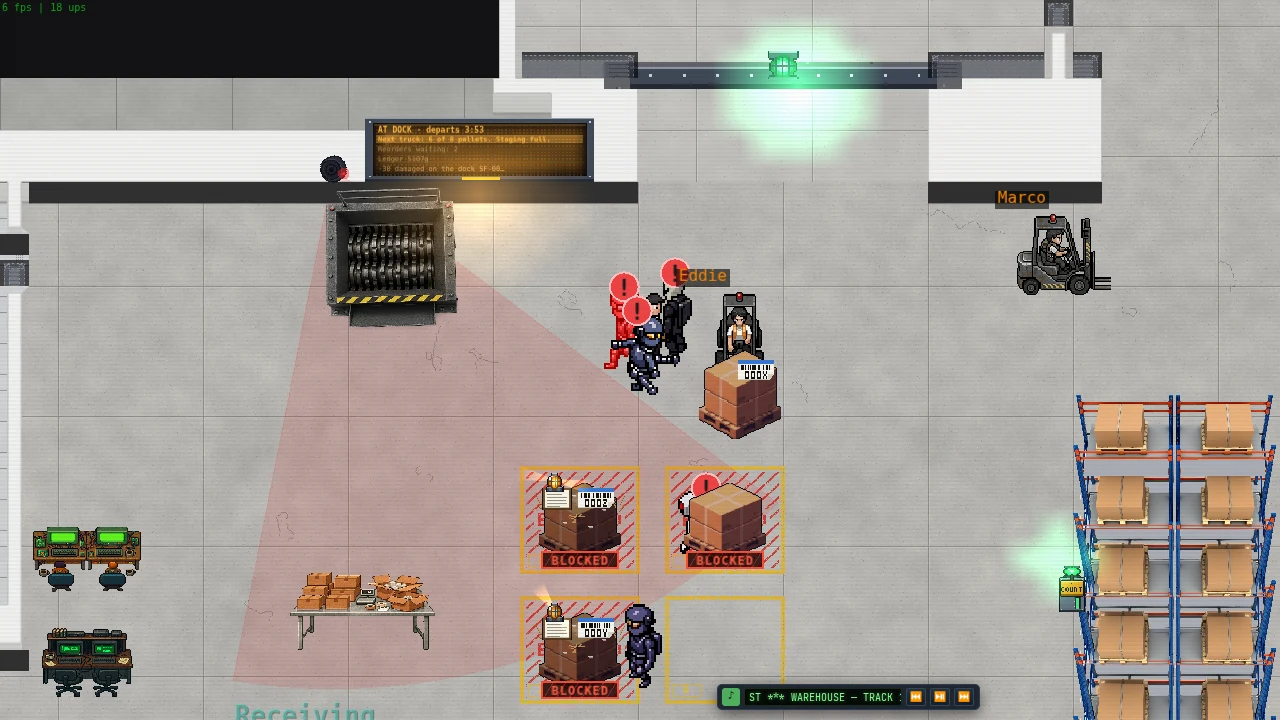
- The door lamp. Green: the truck is open.
- The wall display: the truck line, the next truck’s load, reorders waiting, the ledger.
- A pallet coming off the truck on a forklift.
- A BLOCKED bay: a pallet is sitting on it.
- A free bay.
Readings
The truck
The truck runs on a clock. The clock does not care whether the dock is ready.
| Phase | Lasts | What you see and hear |
|---|---|---|
| Away | until 2 minutes before arrival | Door down, door lamp red. |
| Inbound | 2 min | The PA counts the truck in and says how many pallets are on the manifest. The door lamp goes amber. |
| Docking | 10 s | The truck reverses in and the door rolls up. The load is locked at this moment. |
| Open | 5 min | Pallets on the bed. The PA warns at 60 s left. |
| Departing | 8 s | Whatever is still on the bed leaves with the truck. |
Arrival to arrival is 10 minutes, whether or not the dock is clear. The truck brings at most 8 pallets, and never more than there are free staging bays. The number is on the PA and on the wall display.
“Receiving: Truck departs in 1 minute. The bed is empty, which is how we like it.”
The wall display and the bays
The wall display west of the door shows the truck line, the ledger and the last receipts. When the next truck will bring fewer pallets than planned, its line goes bold. A staging bay is either free or BLOCKED: a pallet, a box or an unridden forklift on a bay blocks it.
The pallet and its slip
Each pallet carries a tag and a packing slip: vendor, PO, ship-to, its SKU lines with their quantities, and a serial on serialised lines. The sticker on the pallet has a beacon that reads unchecked (nobody has stamped the slip), received or flagged.
A torn wrap and a red SHORT on a pallet mean someone lifted a unit off it. A red damaged chip on a scan line means units were damaged on our dock, not the vendor’s. Hold L on either for its card.
What can be wrong with a slip
About 14 per cent of pallets are wrong, in five ways. The scanner catches three of them.
| Kind | Chance | Does the scan show it? |
|---|---|---|
| Short: fewer units than the slip | 3 % | Yes. |
| Over: more units than the slip | 2 % | Yes. |
| Wrong model | 4 % | Yes. |
| Wrong serial | 3 % | No. Compare the slip’s serial with the pallet’s by eye. |
| Wrong site | 2 % | No. The slip must say Warehouse A; check the ship-to. |
The receiving desk
The desk screen counts the slips waiting and the minutes to the next audit. E Receiving log opens the log: one row per stamp and, once it is settled, Compliance’s verdict, the gold and the reason. The second tab, Receipts, holds the last 5 departures: what was received, what went back, the fees, and the ledger before and after.
A receipt is a printout of a decision somebody has already made.
Procedures
SF-211: Unload a pallet and stage it
- Get on a forklift on the warehouse floor.
- Drive to within 3 tiles of a pallet on the truck bed and press C. You lift it. It stays yours for 60 seconds after you leave it.
- Drive to a free staging bay and press C. You are paid 2g for the unload, once per pallet.
If you dismount, die, leave the floor or disconnect while carrying a pallet, it goes back where it was.
SF-212: Check a slip
- Stand within 4 tiles of a staged pallet and press E Check slip.
- For each line, hold E to scan it. It takes 0.6 s (0.3 s with Shipping reputation 25 or more). The scan shows the real SKU, quantity and, on serialised lines, serial.
- Compare what you see against what the slip claims. Check the serial and the ship-to by eye: the scan will not.
- Press RECEIVE if it is right, FLAG if it is not.
Everyone looking at the slip sees every scan and every stamp. You may stamp without scanning; the panel tells you what that means: “Nothing scanned. Compliance will check for you.”
SF-213: Put a pallet away
- Lift a stamped pallet from staging with C.
- Drive to its home bin on the racks (the pallet’s card names it) and press C.
- You are paid 3g and 1 Shipping reputation, and the toast names each bin.
An unstamped pallet is refused (“Stamp the slip first. Receiving has a form for this.”), and so is a full bin. Either way the pallet stays on your forks.
SF-214: Read the audit
- Wait for the next truck’s arrival: that is when the audit settles.
- Each stamp comes back as one line in your log and a toast. Read it against the table below.
| Your stamp | The slip was | Result |
|---|---|---|
| RECEIVE | clean | +4g, +1 rep |
| FLAG | bad | +20g, +2 rep |
| RECEIVE | bad | Fined 10g |
| FLAG | clean | Fined 6g |
A fine never takes your gold below zero; the rest goes on your record and is settled at your next login.
SF-215: Sell surplus at the price board
- Go to the price board in the Shipping Dock room and press E on it. The panel lists each SKU with a price, a trend and its surplus: what the bin holds above what the building needs.
- Choose a row, choose up to 4 units, and press SELL.
- The sale becomes an order. Anyone can pick, pack and ship it; the crew takes it after 4 minutes.
- The ledger books the price when the carton reaches the end of the line, not the price you clicked.
SF-216: Fill a bounty
- Press E within 2 tiles of the bounty board or its drop pad. The panel lists 6 requests.
- Gather the items first: materials in your bag, a boxed enemy of the right family on the pad, chemistry substances, or a refurbished part from the station bench.
- Hold E for 2.5 s to fill it.
- You get the reward and 2 Shipping reputation. The first to fill takes all of it.
SF-217: Carry mail and parcels
- At the outbox, press E. It lists the next 4 parcels; take one. You can carry 2 things at a time, mail and parcels together.
- Deliver a parcel with E at the delivery contact of its camp, in that camp’s zone. You must have discovered the zone.
- Deliver mail by hand, with E within 2.5 tiles of the addressee, or at a post desk.
To send your own mail, use the Post Counter: an exact player name, up to 3 stacks or one piece of gear or one badge, and one of the stock notes. No gold. Postage scales with your level, and costs more for gear or a badge.
SF-218: Carry a crate up (freight)
- Cartons for the station roll into the freight cage. When the requisition is complete they seal into one crate and lift; the trip takes 60 s.
- At the station, press E to lift the crate, hands empty. Carry it to the stock it is for: the Maintenance Bay shelf, the Medic Lab cabinet or the coolant rack.
- Hold E to scan it in: 2 s (1 s with the Logistics implant).
- You get the courier fee and 1 station standing.
SF-219: Decide a requisition
- A department files a requisition. It shows in your handheld’s Inbox under Requisitions.
- Press APPROVE or DENY. A denial asks for a reason.
- An approved requisition becomes a pick order marked for the station. It does not expire.
SF-220: Send a part back (RMA)
- At the rack bench, a failed or burned Tier 3 or Tier 4 part has an RMA button next to SCRAP. Hold it for 3 s.
- At the freight lift, press E to send the RMA down. The carton reaches the warehouse cage 60 s later.
- A warehouse player carries it out on the line. At a later docking it comes back as a replacement, a credit, or “no fault found”.
SF-221: Feed the shredder
Carry a tagged item to the shredder and press the carry key. You get materials, no gold, and the slip names you. Station property is refused: “Station property. It goes back.”
Decisions
Blind stamps against scanned ones
Stamping is free and instant. The audit pays 4g for a right RECEIVE and 20g for a right FLAG, and fines 10g for a wrong RECEIVE and 6g for a wrong FLAG (the ledger takes a further 5g on a wrong flag). About 14 per cent of pallets are bad.
- A blind RECEIVE is a bet that the pallet is clean. It pays 4g when you are right, and costs 10g plus the missing goods on the ledger when you are not.
- A scan costs 0.6 seconds a line, and it does not catch a wrong serial or a wrong site. Scan and skip those two checks and you are still gambling.
- A catch pays 5 times a clean receive. The money in receiving is in reading the slip, and nobody else is going to.
- 3 wrong stamps inside 2 hours is a Compliance notice and a 15g fine.
Racing Clerk 7
Clerk 7 stamps any staged pallet nobody has touched for 60 seconds. He always receives a clean slip, and flags a bad one only 50 per cent of the time. His stamps pay nobody. If you stamp a pallet after he does, your stamp replaces his and the audit pays you.
So the dock rewards the player who reaches a pallet first and reads it, not the one who waits. When he misses one you caught, he says so: “You found a discrepancy I did not. I would like it noted that I was busy.”
Clogging the dock
The truck only brings what the free bays can hold. A pallet left staged, a box left on a bay or an unridden forklift parked on one: each is a blocked bay, and the next truck brings one fewer. With every bay blocked, that slot has no truck at all, and the schedule moves on.
The code does not treat clogging as an offence; nobody is fined for it. It does cost everyone: no pallets means no put-away pay, no stock and no sales. The way to clog on purpose is to over-order (see the Warehouse floor packet), because a pallet that cannot be put away stays where you left it.
Pallets still on the bed when the truck leaves go back in the queue, and cost the ledger 5g each.
Taking a unit off a pallet
Hold E on an unchecked pallet for 2 seconds, hands free and on foot. You get one loose unit; the ledger loses its value at once; the pallet shows a torn wrap and SHORT to everyone nearby; and its tag names you. One unit per pallet, and only before the slip is stamped: after that, “Already stamped. Too late to lose a unit.”
- Fence it: put the loose unit on the shipping line. It is not shipped; the packer is paid 50 per cent of its value.
- Caught: if anyone (Clerk 7 included) correctly flags that pallet, you are fined the unit’s value plus 10g, and the flagger is paid as usual.
- Not caught: if the pallet is received, you are not fined. Whoever stamped RECEIVE takes the wrong-receive fine instead.
Both names are on the pallet’s tag either way. If you hold the pallet’s stamp yourself, you cannot lift from it.
Damaging a pallet
A live enemy within 2 tiles of a pallet for 10 seconds damages a unit, and thrown chemistry can damage up to 4 per pallet. The ledger posts the loss at once: “You damaged n SKU name on serial. That is a ledger line, with your name on it.” If someone correctly flags the damage, whoever caused it is fined the units’ value plus 10g. Flagging your own damage earns no bounty.
The price board
The panel shows a price; the ledger books the price at arrival. Each unit sold lowers the price by 2.5 per cent. It recovers 20 per cent of the gap every 6 minutes, and never drops below 20 per cent of base. Now and then the board puts a 40 per cent boost on one SKU with surplus, for 20 minutes.
- Sell into a boost, not after one.
- Selling does not trigger a reorder, and only the surplus can be sold.
- The ledger gets the money, not you. The seller gets 1 reputation when someone else packs the carton; the packer earns a 10 per cent commission, capped per hour.
- One open sale per player, 3 open in total. A seller who fills the board with low sales blocks everyone else.
- A relabelled sale carton fails its line, and no sale is booked.
Bounties
The first to fill takes the whole reward, and the board tells the others who beat them. Gather everything first and hold E last. You can fill the same request once every 60 minutes. Chemistry requests consume what you hand over.
Requisitions
A department’s request waits on you. If nobody decides within 60 seconds, Mr. Patterson approves it; he never denies. A denial costs the denier a 10-minute cooldown, names them to the requester, and refunds the requester in full.
- A backorder (the bin is empty) forces a reorder on that bin: “id backordered: bin bin is empty. It rides the next truck.” Special parts are bought at 70 per cent of their value at the next docking.
- Standing orders cost the station nothing. A critical one carries a 6g bonus and a 15-minute clock; an order that goes overdue puts a notice on the board and a PA line aboard.
- Don’t take the parts you are being asked to replace. If a player takes parts off a station shelf and does not use them within 15 minutes, the standing order is unpaid: the claimer earns no pick bonus and the history names who took them.
Freight
Setting a crate down pings the station after 5 minutes and forfeits your courier fee: the next player to pick it up and scan it in collects it. After 10 minutes the maintenance bot carries it in for nothing. Whoever filed the requisition gets no courier fee, whoever carries it.
RMA
Sending a failed Tier 3 or Tier 4 part back is a roll. A failed part comes back a replacement 60 per cent of the time, a credit 30 per cent, and no fault found 10 per cent. A burned part is worse: 40 / 30 / 30. A burned module comes back repaired 85 per cent of the time. A credit pays 50 per cent of the part’s price into the Station Fund, not into parts.
“NO FAULT FOUND. Tested at vendor. Returned as received.”
The shredder
Feeding the shredder a serviceable unit costs the ledger its value, and the slip names you. Feeding it a carton that belongs to an open pick order fails that line, and the order’s history names you.
Who’s watching
- Compliance runs the audit at every arrival and keeps your record of wrong stamps.
- Mr. Patterson patrols the shipping floor. After a wrong stamp, or 3 blind stamps in a row: “I have read your receiving record. A stamp is not a gesture. Do try reading the slip.” With a clean record: “Your stamps hold up under audit. I am putting it in writing so you cannot take it back.” He has no fine of his own.
- The ledger names you on every lifted unit, damage, reorder, cancel, fee, redelivery and write-off.
- Asset tags keep the last 12 people to touch a thing.
- The receipt prints at every departure.
- The PA announces the truck, a short load, a full staging area, the pallets left behind, and the audit.
“The Ledger: balanceg. Every unit accounted for. Some of them twice.”
Bring
| Bring | Why | Checked |
|---|---|---|
| A forklift | You cannot lift a pallet on foot. | |
| The handheld | Requisitions, orders and counts. | |
| Free hands | Scans, lifts and crates all need them. | |
| A reason to stand at the desk | The log and the receipts. | |
| A path to the line | Sale cartons, fenced units and picks all end there. | |
| Your own bag | The bounty board takes from it. |
Procedure SF-310 · Getting to the station
Getting to the station
The Station is a place you are cleared to visit, not one you stumble into. This packet is how you get on the manifest, how you arrive and leave, what the Station does while you are away from it, and how to read a room before you stand in it. Everything that needs an implant, a toolkit or a plan has its own packet. This one gets you through the door.
Readings
The manifest
You need level 30 and a run of tickets. Dr. Ling gives the first three, Pad Controller Teague the last. Each appears when the one before it is done.
| Ticket | Where |
|---|---|
| 1. Trace the Signal | Ridge Uplink UL-00 (Frozen Peaks) |
| 2. Restore the Uplink | Ridge Uplink UL-00 (Frozen Peaks) |
| 3. Clear the Pad | Glacial Ridge Pad (Frozen Peaks) |
| 4. Report to the Pad | Glacial Ridge Pad (Frozen Peaks) |
SF-311 has the steps and the catch at each one.
The portal
One portal, in the teleporter room. It has four looks and each is an answer.
| Look | What it means |
|---|---|
| Teal halo, ring segments turning slowly | Idle. It is live whether or not it will take you. |
| Segments spin up, an inner ring counter-rotates, a light column rises | Somebody is on the pad. It charges for anyone standing there, cleared or not. |
| A white flash and a column at the pad | Someone who stood on it has left. If the flash is yours, the map has picked a destination. |
| Red flash, a ring clamping onto the centre, a buzz, then a dim red pulse | Refused. Your pattern is not on file for this portal. |
Refusal line: “Pattern lock refused. Your pattern is not on file for this portal. Clearance is issued at the Glacial Ridge pad.”
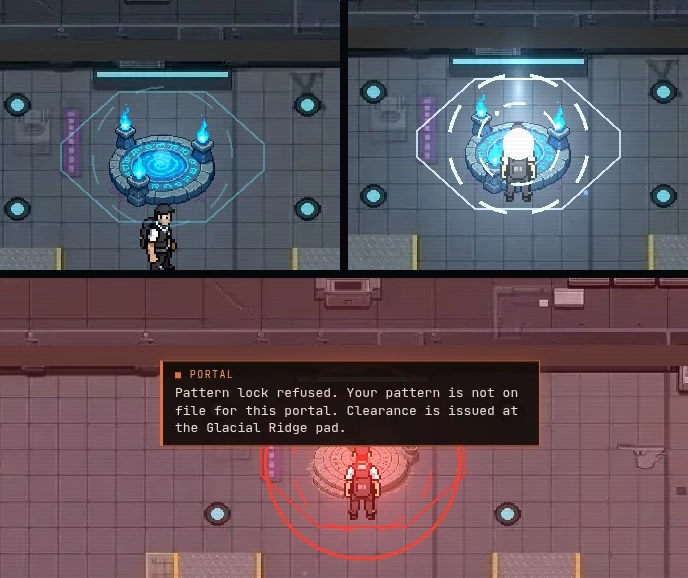
- Idle: the teal halo and its ring segments.
- Charging: the light column rising over the pad.
- Refused: the red flash and the ring clamping in.
What a door says
A door you cannot open reads AUTHORIZATION REQUIRED. A sealed section’s door adds a second line of its own, different at every door. A door that is locked only because its room lost power says so instead (see Engineering, door panels). Doors do not lie. They are sometimes unhelpful about it.
Transport Hall: “Transport Hall: manifest only. Clearance is issued at the Glacial Ridge pad.”
Reading a room
A room is one of three things.
| What you see | What it is | What it does to you |
|---|---|---|
| Lit, three green bars (C L F) on the panel | All three channels up | Nothing. This is the good one. |
| A dark wash with slow amber pools; one or more bars dark red | A channel is out | Compute out: terminals refuse and the racks go dark. Lighting out: your view shrinks. Facility out: the room’s implant doors lock and its hallway doors stand open. |
| Unlit, no amber, no panel bars, the door sealed | Sealed: not restored yet | Nothing runs there and nobody gets in. It opens when the Station restores that section, and the PA says so. |
A dark bar means that channel has lost power in this room. The panel itself is Engineering’s subject; here, only the colours.
The emergency lamp. Arrive aboard into a room whose Lighting is out and you are handed a lamp: a small warm pool of light around you, tagged EMERGENCY LAMP. It is stowed the first time you stand in a lit room. Lights going out around you while you are already aboard do not issue one. You are expected to have noticed.
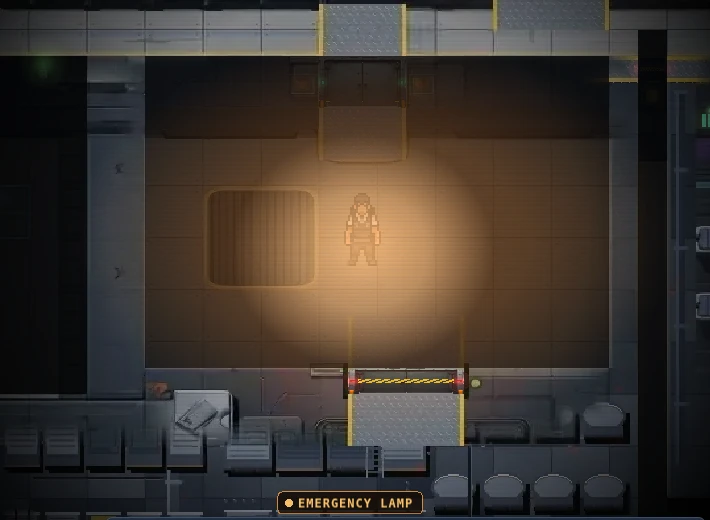
- The dark wash: Lighting is out in this room.
- The lamp: a small warm pool around you.
- The EMERGENCY LAMP tag.
What the Station does while you are not there
The Station does not keep a clock for visitors it does not have. Some things pause with nobody aboard and some do not.
| Pauses with nobody aboard | Keeps going |
|---|---|
| The incident clock: a natural incident arrives every 6 to 12 minutes of time with someone aboard | Batteries: a room that was draining when the last person left has kept draining, and one on feed has kept charging |
| The storyteller’s budget, which accrues only while someone is aboard | A tripped breaker stays tripped until someone resets it |
| MA-1: no movement, no decisions, and a hold in progress waits | The shift boundary, which is on the clock and not on you |
| Security Drone SD-9: it does not patrol an empty ring |
Aboard means standing in the Station, not in a tunnel and not outdoors. That is the only test, and every system that cares uses the same one.
Procedures
SF-311: Get on the manifest
- Reach level 30 and take ticket 1, Trace the Signal, from Dr. Ling. It is a listening job: stand next to the Ridge Uplink and hold while it listens to the carrier.
- Ticket 2, Restore the Uplink. The uplink needs 3 repairs (a feed horn, an amplifier, a clock reference), all at the ridge. Fix every one, then hold at the console to re-acquire the lock. The console will not take the hold until all of them are done.
- Ticket 3, Clear the Pad. The Cold Storage Warden is on the pad. Defeat it. It is a boss; bring what you would bring to one.
- Ticket 4, Report to the Pad. Walk up to Pad Controller Teague and talk to him. Standing at his tile arms the turn-in and talking completes it. That puts you on the manifest.
SF-312: Launch
- Talk to Teague at the Glacial Ridge pad and pick Transport to the Station. There is no fee.
- Stay put for the countdown. The screen shakes and counts down, and the launch is sent when it ends. If you have stepped away, or the Station is not loaded, nothing launches and you rematerialise where you stood.
- Arrive on the portal in the teleporter room. The ring segments light one at a time and a confirmation ring closes. The portal is saved to your fast-travel list.
The first time, an ACCESS GRANTED card slides in (your name, your clearance, “Offsite-1”, the date), the world map logs the Station, and the next time you open the map it reveals it.
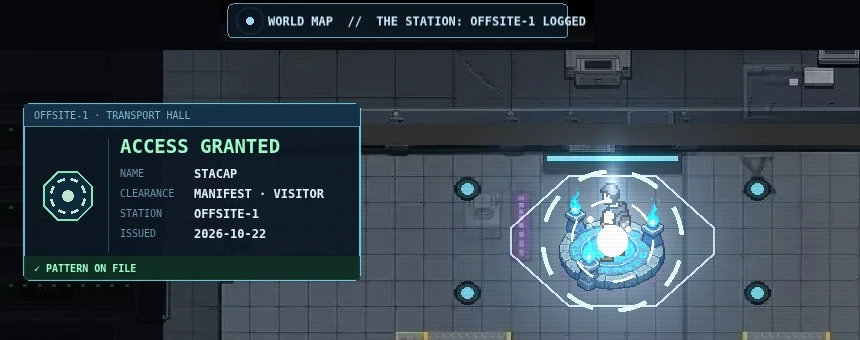
- The ACCESS GRANTED card: name, clearance, station, date.
- The ring segments, lit, with the confirmation ring closed.
- The world map toast: the Station is logged.
SF-313: Leave
- Stand on the portal in the teleporter room. There is no pad and no exit door; the portal is the way out.
- Open the picker and choose where. It lists the portals you have saved.
- Wait for the flash. The map closes, the white flash plays where you can see it, and then you go.
SF-314: Read a room before you stand in it
- Look at the floor. Amber pools breathing slowly: Lighting is out. A flat dark wash with nothing in it: sealed.
- Hold L on the panel by the door for its bars. Green is up, dark red is out.
- Note which channel is out before you note anything else. Compute out shuts the terminals; Facility out locks the implant doors behind you.
SF-315: If you wake up aboard without clearance (the glimpse)
This one is not a choice, which is why it is here. From level 15, before you are on the manifest, a death can once route you to the Station’s medic lab instead of the warehouse. The chance starts at 3 % and rises by 1 % for every such death that did not take it.
- Read the countdown. “Routing has flagged the error. Pattern recall in time.” You have 90 seconds before you are sent home.
- Stay in the lab, or step out as a stowaway. The lab is a safe zone. The first step out of it puts you on the record: “STOWAWAY. You’re on the Station with no manifest entry.” Routing may then put a waypoint on your map.
- Stay off the ring. Without ring access, Security Drone SD-9 notices you from 7 tiles, barks and follows. A lock-on ring closes over 2 seconds. Break line of sight before it closes and you are free, and it will not spot you again for 3 seconds.
- The ward key is a visitor badge in the lost-property tray in the Cavern Office, in the Cave Network. Searching the tray takes 3 seconds. It opens the medic ward and nothing else: “Opens the Offsite-1 medic ward. Expired. The door doesn’t check.”
You cannot save the portal or take the ring. Implants are not for you either: “Guest pattern. Implants are issued to cleared staff.”
Decisions
When to go
Nothing on the Station accrues while you are away, and nothing there is waiting on you. Going aboard is a decision about your time and nothing else. Behind you, the floor keeps its own clock: Mr. Patterson approves an open reorder after 60 seconds whether or not you are there to decide (see Warehouse floor).
So go for a reason. Nobody aboard hands out work. The work is whatever has broken and whoever is standing at the panel. If nothing is wrong, you have a good view of a corridor.
Alone, or with a crowd
The Station scales its trouble to who is aboard, and it does so openly.
- Alone, the worst it will send is severity 2. One person aboard caps every temperament there.
- Each extra person raises the storyteller’s budget by 35 %, up to 4 times the base. A bigger budget buys more events (see Faults and incidents).
- A Red shift needs 3 aboard when the shift begins. With fewer, it is rolled as Rough.
So if you want a quiet shift, go alone. If you want a busy one, bring people. If you are alone and wish it were more interesting, you cannot make it so. This is the Station being fair.
Dying with clearance
Once you are on the manifest, every death reboots you in the Station’s medic lab, not in the warehouse and not at a camp. That holds wherever you died. The lab, the bed and the degraded pattern you wake with are Medical’s subject. What matters here is that the Station is where you come back to, whether or not you planned a visit.
Sealed rooms
A sealed room costs you nothing and offers nothing. Do not spend time at its door. The Station opens its sections one at a time, with a PA line when it does, and a room that was sealed an hour ago is worth a look.
Arriving into the dark
If the lights are out where you land, the lamp is for walking, not for working. Your view is small and the lamp widens it a little. Walk to a lit room, let the lamp stow itself, and read the panel there.
Who’s watching
- The PA. The Station announces what it restores, what it loses and what needs an Engineer (see Engineering and Faults and incidents).
- Security Drone SD-9. It watches the ring for anyone without ring access. A cleared player is never a target.
- The storyteller’s shift. The shift is on the clock; whether it has anything to say depends on who is aboard (see Faults and incidents).
- Security. Aboard, you can hit someone, and the Station will remember it (see Security and Holding).
Bring
| Bring | Why | Checked |
|---|---|---|
| Level 30 and the manifest tickets done | Teague launches no one else | |
| A portal saved somewhere you want to go back to | The picker lists only what you have saved | |
| Nothing for the lamp | It is issued, and stowed on its own | |
| An implant, if you plan to work | It decides which doors open for you; it is fitted at the implant terminal (see Engineering and Medical) |
Procedure SF-410 · Engineering
Engineering
The station runs on rooms that each have a panel, a battery and three channels, and on racks that turn power into compute. Something is always wearing out. You keep it fed, keep it fitted, and decide which broken thing to fix first. You do not need the Engineer implant to do any of it. The implant makes you faster and gets you the paperwork.
Readings
The room panel
Every online room has a Room Panel. It holds a battery and three channels. When the feed is lost the battery drains and the channels shed in a fixed order, so the order is the thing to learn.
| Channel | Board label | What it runs | Sheds | Comes back |
|---|---|---|---|---|
| Compute | COMPUTE | Racks, terminals and job stations | First, when the battery falls below 30 % | Last, at 50 % |
| Lighting | LIGHTING | Lights and displays | Second, below 15 % | Second, at 25 % |
| Facility | FACILITY | Doors and the things that keep you alive | Last, at 0 % | First, at 5 % |
At base load, with the feed gone, Compute sheds after about 3.5 minutes, Lighting 1.5 minutes after that, and Facility 3 minutes after that. On feed, a panel recharges at 0.5 % a second, so an empty panel has Compute back 100 seconds after the breaker is reset. The alarm goes up when a channel sheds and clears only above 75 % with all three channels back. The medic lab and the teleporter room are on backup power: they never shed and read ON BACKUP.
“Power for this room. Three channels and a battery. Read the log before you blame anyone.”
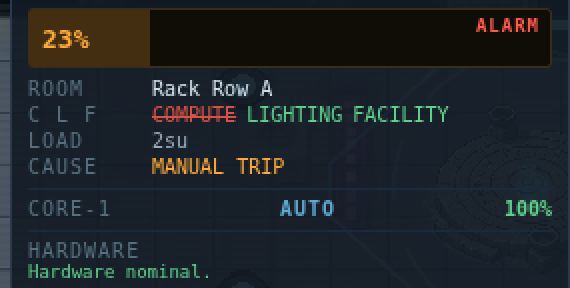
- The battery. The bar drains while the room is off feed.
- ALARM: a channel has shed. It clears only above the clear line, with all three channels back.
- The three channels, C L F. A struck-through channel has shed.
- The cause: a type, never a name.
The NOC board
The NOC tab in UptimeWatcher shows one row per online room: battery bar, three channel pips (C L F), load, cause and ALARM. Alarm rows flash and sort to the top. The cause is a type, never a name: MANUAL TRIP, INCIDENT, WEAR or ON BACKUP.
| Board element | What it tells you |
|---|---|
| SHIFT SLA and pct% UPTIME | The share of this shift the station kept every room fed. Target 95 %. AT RISK within 2 % above it, BREACHED below it. Everyone aboard shares the number. |
| The shift | 2 hours, the storyteller’s shift. A closed shift is kept; the new one starts at 100 %. The PA stays quiet for the first 10 minutes of a shift. |
| SUPPLY vs DEMAND, LAST 5 MIN | Supply against demand over the last 5 minutes. If the amber line sits above the cyan one, something will shed. |
| RACK n Ttiers worstState rate | One line per rack: its tiers as a string (11121), its worst part’s state, its compute rate. |
| Door rows | PANEL OPEN, BOLTED, BYPASSED, LIVE. Never a name. |
| PARTS LOW, FIXTURES: n damaged | The shelf is at or under 2 of a material, or fixtures need work. |
| LINK LOST | The board room has lost Compute. The board freezes and the timestamp stops. |
When nothing is wrong the board says so: “All rooms within spec. Somebody should be suspicious of that.” When the link is down: “LINK LOST: NOC compute offline. Showing last known state, age old.”
Everyone sees the board. Engineers get live TRIP and RESTORE breaker buttons. For everyone else they are greyed with the tip “Engineer implant: remote control. Anyone can flip it at the panel itself.”
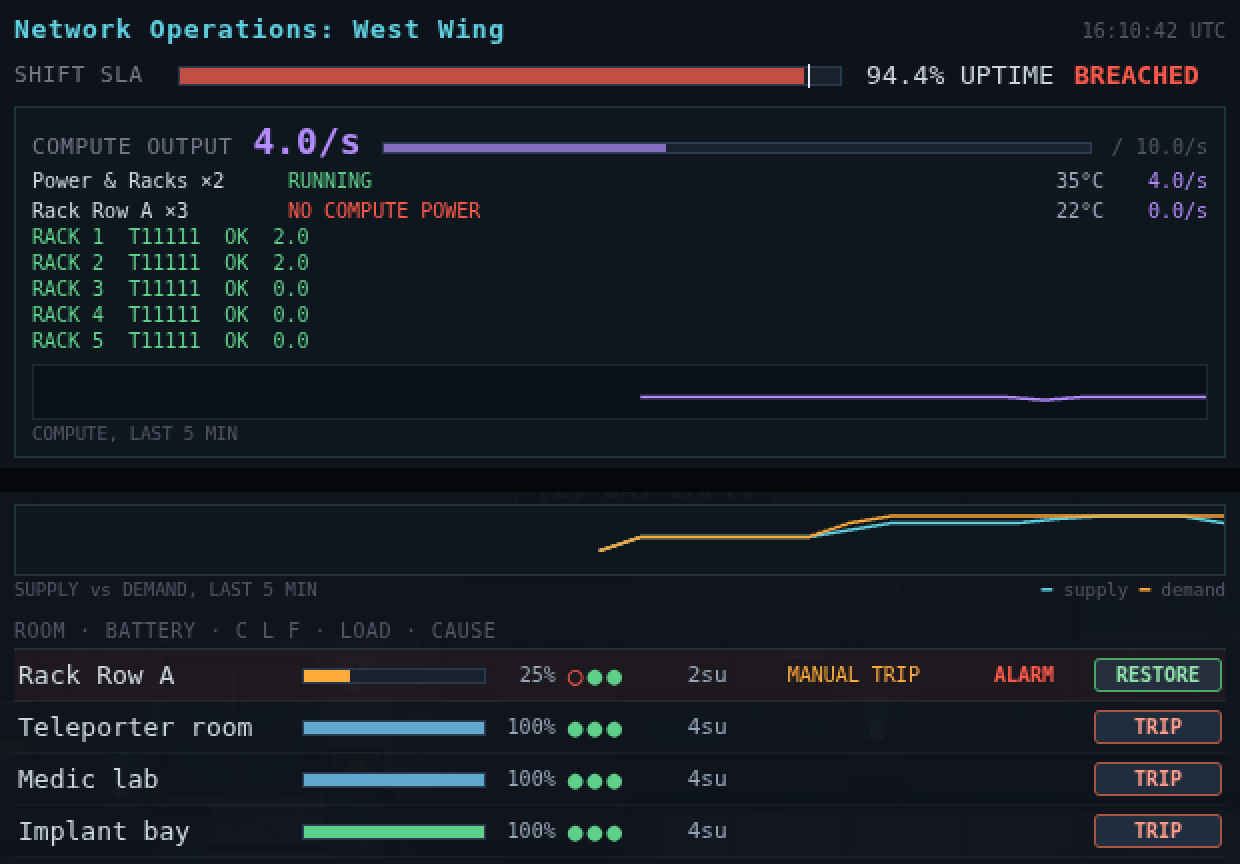
- The shift SLA. Below target it reads BREACHED, and everyone aboard shares it.
- One line per rack: its tiers as a string, its worst part’s state, its rate.
- SUPPLY vs DEMAND: if the amber line sits above the cyan one, something will shed.
- The alarm row, sorted to the top: battery, C L F, load, the cause, ALARM, and RESTORE for an Engineer.
Rack parts and tiers
A rack is a frame, a compute board and 5 slots: Processor, Memory, Storage, Power Supply and Network Link. Every rack starts all tier 1 and the tiers go up to 4. A tier changes three things: what the part draws (su), what it multiplies (compute) and, for the power supply, the cap on the rack’s whole draw. Prices are what the Allocation Terminal charges the Station Fund.
Processor
| Tier | Price | Draw | Effect |
|---|---|---|---|
| Tier 1 | 100g | 2 su | ×1 compute |
| Tier 2 | 300g | 3 su | ×1.3 compute |
| Tier 3 | 800g | 4 su | ×1.7 compute |
| Tier 4 | 2000g | 6 su | ×2.2 compute |
Memory
| Tier | Price | Draw | Effect |
|---|---|---|---|
| Tier 1 | 60g | 1 su | ×1 compute |
| Tier 2 | 180g | 1 su | ×1.1 compute |
| Tier 3 | 500g | 2 su | ×1.2 compute |
| Tier 4 | 1200g | 2 su | ×1.3 compute |
Storage
| Tier | Price | Draw | Effect |
|---|---|---|---|
| Tier 1 | 50g | 1 su | ×1 compute |
| Tier 2 | 150g | 1 su | ×1.05 compute |
| Tier 3 | 400g | 1 su | ×1.1 compute |
| Tier 4 | 1000g | 2 su | ×1.15 compute |
Power Supply
| Tier | Price | Draw | Effect |
|---|---|---|---|
| Tier 1 | 80g | 2 su | Caps the rack at 9 su |
| Tier 2 | 240g | 2 su | Caps the rack at 12 su |
| Tier 3 | 600g | 2 su | Caps the rack at 16 su |
| Tier 4 | 1500g | 2 su | Caps the rack at 20 su |
Network Link
| Tier | Price | Draw | Effect |
|---|---|---|---|
| Tier 1 | 40g | 1 su | ×1 compute |
| Tier 2 | 120g | 1 su | ×1.05 compute |
| Tier 3 | 300g | 1 su | ×1.1 compute |
| Tier 4 | 800g | 1 su | ×1.15 compute |
The rack draws the sum of its parts’ draw plus 1 for the board: 8 su all tier 1, 14 su all tier 4. Its compute is the product of the four factors, scaled down if the draw is above the supply’s cap.
| Rack word | Means |
|---|---|
| PSU LIMIT | “The power supply cannot feed what is installed. The rack is throttled to its cap.” |
| LINK DOWN | “The network link has failed. This rack’s compute is not reaching the station.” It still draws. |
| RACK OFF | “The power supply has failed. The rack is off.” |
| THROTTLED | The grid is not giving the room all it asked for. |
| IDLE | “Idle. This rack draws nothing and produces nothing. Parts can be swapped without a fuss.” |
| OK, WORN, FAILED, BURNED OUT | The part’s state, below. |
| Part state | What it does |
|---|---|
| WORN (from 70 % wear) | Running at reduced output, 10 % off that part’s factor. |
| FAILED (100 % wear) | Processor, memory, storage: 50 % off. Power supply: rack off. Link: link down. |
| BURNED OUT | Beyond repair at the rack. Take it to the Refurbishment Bench. |
Parts wear from heat, and only while someone is aboard: a rack room above 50 °C wears every working part in its racks one point a minute for each 10 °C over. An idle station does not age.
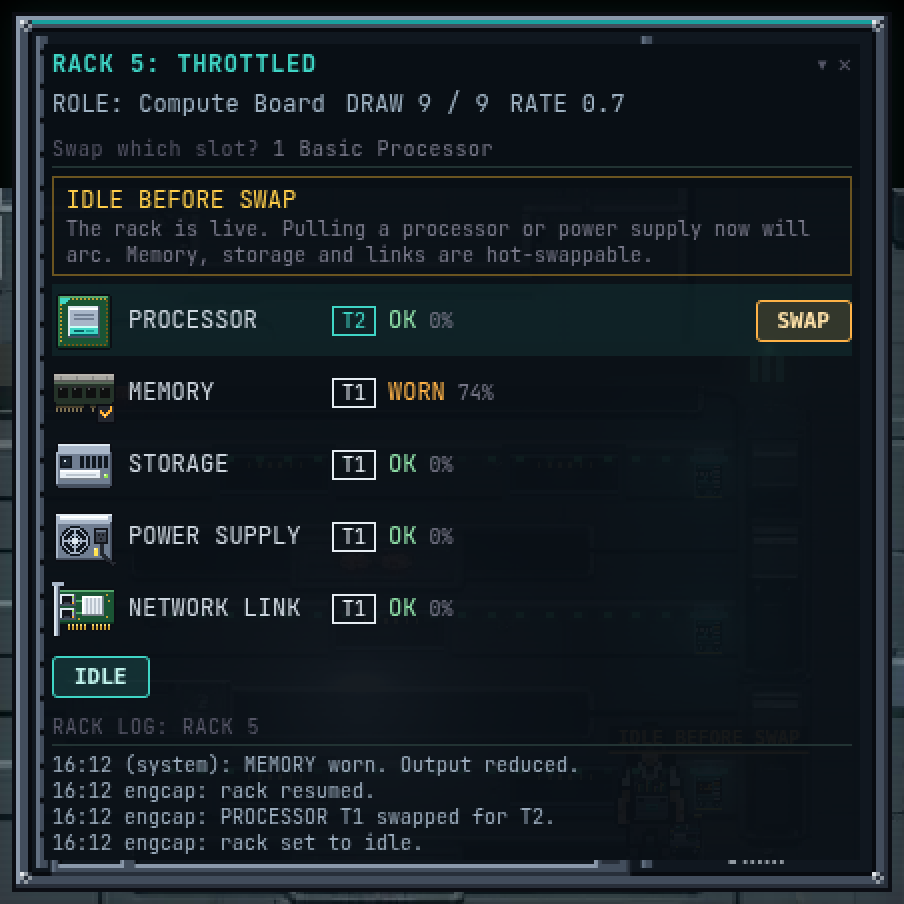
- The rack word. THROTTLED: the room’s panel is still recharging.
- DRAW against the supply’s cap. 9 of 9: one more su and the rack is throttled to its cap.
- RATE: this rack’s compute.
- The live-swap warning. A processor or power supply needs IDLE first.
- A worn slot: running at reduced output.
- The rack log, with names, for whoever is standing here.
The Core, the UPS and the transfer switch
The Core is the machine the racks serve. In AUTO the regulator holds it in its safe band and caps its output. In MANUAL the cap is lifted and the setpoint and coolant are yours: “The cap is lifted. Setpoint and coolant are yours. Do not look away.” Anyone may use the console; the log says who did.
The UPS Room holds the station’s battery cabinets. Each one tells you its charge when you look at it: “Battery Cabinet n: pct% charge.” The Transfer Switch reads TRANSFER: GRID or TRANSFER: UPS ONLY. It moves the station onto batteries only, and its hover is honest about it: “Moves the station onto batteries only. Maintenance mode. Somebody always flips it at the wrong time.”
Door panels
7 station doors have a Door Panel: Implant Bay, Supply, Power, NOC, Rack Row A, UPS Room and Maintenance Bay. Not the medic lab, not the teleporter room. The panel is behind a cover and holds 10 jumpers. Pulling one changes what the door does, and the door tells everyone nearby.
“The door’s controls, behind a cover. Ten jumpers, no labels. Somebody wrote the manual. It is not here.”
Which position does what is shuffled per door, and reshuffled at every shift change, so the table below is by function. An Engineer’s card labels each jumper. Everyone else sees numbered caps and learns by watching the door.
| Jumper out | The door does | What everyone sees |
|---|---|---|
| Feed A or Feed B | Nothing alone. Both out: the door acts as Facility-out (an access door locks, a hallway door stands open) | “Lamp flickers once.” |
| Access check | Anyone can open it | “Lamp amber. BYPASSED.” |
| Bolts | Shut for everyone, implants and cranks included | “Bolt bars drop. Red lamps. BOLTED.” |
| Motor | Stuck where it was | “Motor twitch. No slide.” |
| Auto-close | Stays open once opened | “A long chime.” |
| Status lamp | Nothing | “Lamp goes dark.” |
| Containment link | A containment slam is ignored | Nothing at all |
| Panel power | Nothing at the door. The panel is live | “Sparks at the panel. LIVE.” |
| Test lamp | Nothing | “Lamp blinks three times.” |
Seating the jumper back undoes it. The reaction line goes to anyone within 6 tiles of the door.
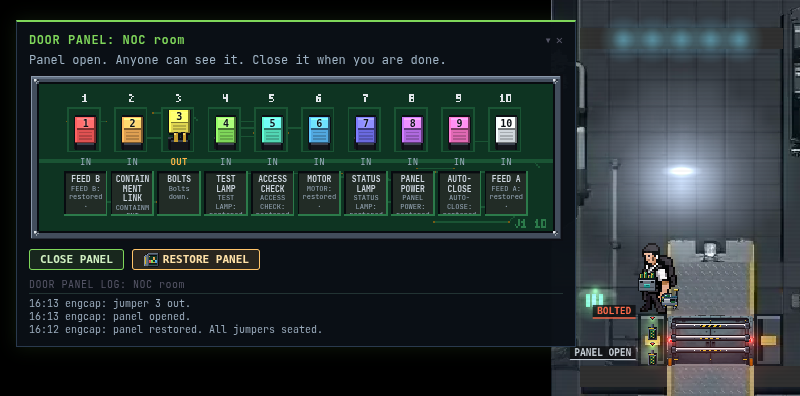
- The caps. Cap 3 is pulled: it reads OUT; the rest are IN.
- The labels. Only an Engineer sees them; everyone else gets numbered caps.
- CLOSE PANEL, and RESTORE PANEL for an Engineer.
- The door panel log, with names, in person only.
- The bolt bars and red lamps. The tag reads BOLTED, and the NOC shows it too.
Fixtures
Lights, wall panels, windows and door frames each have a condition and a repair path back to known good, which is how the station was built. A step toward a known state costs 50 % of its parts, rounded up. Hold L on a fixture for its card: CONDITION, PATH, NEXT STEP, FIXTURE LOG.
Light bank
| Condition | Step | Becomes | Parts | Time |
|---|---|---|---|---|
| Blown | Replace bank | lit | 1 fuse + 1 glass | 8 s |
| Scorched | Clear | frame | None | 4 s |
| Frame | Rebuild | lit | 1 cable + 1 fuse + 1 glass | 12 s |
Wall panel
| Condition | Step | Becomes | Parts | Time |
|---|---|---|---|---|
| Sparking | Re-seat cable | intact | 1 cable | 6 s |
| Scorched | Clear | open | None | 4 s |
| Open | Fit panel | intact | 1 plate | 8 s |
Window
| Condition | Step | Becomes | Parts | Time |
|---|---|---|---|---|
| Cracked | Glaze | intact | 1 glass | 6 s |
| Shattered | Sweep | frame | None | 4 s |
| Frame | Frame | intact | 1 glass + 1 strut | 10 s |
Door frame
| Condition | Step | Becomes | Parts | Time |
|---|---|---|---|---|
| Bent | Straighten | intact | None | 6 s |
| Stuck | Free | bent | 1 strut | 8 s |
Debris stays until someone sweeps it: “Debris. MA-1 can sweep this. MA-1 is the only one who wants to.”
Work orders and incidents
Things break by themselves, on a cadence, and a player can break them. Each is an incident with a room, a hold time to fix it and a timer after which it gets worse. A room holds at most 2 open incidents and the station at most 4 that broke by themselves.
| Incident | Hold to fix | Gets worse after | Becomes |
|---|---|---|---|
| Tripped Breaker | 6 s | 4 min | Feed stays lost |
| Blown Light Bank | 8 s | 4 min | Sparking Cable Tray |
| Sparking Cable Tray | 12 s | 3 min | Tripped Breaker |
| Coolant Drip | 10 s | 3 min | Overheating Rack |
| Overheating Rack | 18 s | 2 min | Tripped Breaker |
| Failed Bus Segment | 24 s | 2 min | Feed stays lost |
| Jammed Door (made by a player) | 6 s | never | Nothing |
An open incident that gets worse says so: “room: incident still open. It has not fixed itself.” It is never lethal: the next state is worse, never fatal. A fix closes the ticket: “Ticket closed: incident, room. +goldg, +xp XP, Station standing +standing.”
Base pay for a fix is 8g and 10 XP for a small one, 12g and 16 XP for a medium, 18g and 24 XP for a large, scaled by your level, with 2, 3 and 4 Station standing. An Engineer is paid 50 % on top, for the paperwork.
MA-1
Maintenance Agent MA-1 is “Facility maintenance firmware in a chassis. Replaces bulbs, clears debris, restocks. Does not touch breakers, the Core or root causes. Players get first pick.” Its policy list, as it recites it: replace light banks; clear debris; apply small patches; restock from the parts shelf; recover what players broke, once nobody has claimed it; never breakers, the Core, root causes or rack upgrades. Hold L on it for the list.
Procedures
SF-411: Read the board and pick a job
- Open UptimeWatcher and go to the NOC tab.
- Check the link. If the banner reads LINK LOST, the board is a photograph. Restore Compute in the board’s room first.
- Read the top row. Alarm rows sort to the top, and a station-wide alarm sorts above a room’s.
- Pick by what gets worse. A Tripped Breaker takes a room’s channels. A Blown Light Bank is a small job that becomes a bigger one in 4 minutes. See Decisions.
SF-412: Reset a tripped breaker
- Go to the room’s Room Panel.
- Hold E. The panel opens and the incident fix starts: Resetting breaker... takes 6 seconds, or half that with the Engineer implant.
- The room is back on feed. The log reads “Breaker reset. room is back on feed.”
To read who did what instead, hold E at the panel when nothing is broken: Pulling audit log... opens the Room Panel Log, the last 40 manual changes, newest first, with names. The names are only here.
SF-413: Trip or restore a breaker from the NOC board (Engineer)
- Open the NOC tab with the board’s link up.
- On the room’s row press TRIP (breaker closed) or RESTORE (breaker tripped).
- You can act once every 1 second. A remote trip is a manual trip audited under your name; a remote restore of an incident closes it unpaid.
Without the implant the buttons are greyed: “Engineer implant: remote control. Anyone can flip it at the panel itself.”
SF-414: Fix a fixture
- Take a crate with the parts from the Parts Shelf (SF-415). The step on the fixture’s card tells you which.
- Stand within 1 tile of the damaged fixture and hold E. The hold label names the step: Replacing light bank..., Re-seating cable..., Glazing window..., Straightening....
- The fixture steps one state toward known good. Repeat until the card reads “Nothing to repair. This is how it was meant to look.” Engineers take 50 % of the time.
Refusals, verbatim: “Missing parts: parts. The shelf is in the Maintenance Bay.” / “Wrong part. This step needs parts, not carried.” / “Not enough part. Need need, carrying have.”
SF-415: Get parts
- Go to the Parts Shelf in the Maintenance Bay and press E. The card shows STOCK.
- Choose TAKE for 1 to 4 parts. Loading crate... takes 1.5 seconds.
- You now carry one crate: up to 4 parts of one family, either fixture materials in any mix or rack parts of one kind. “Crate loaded: n part. It stays on the station.”
- To return it, press E at the shelf: Shelving crate..., then PUT BACK.
If you leave the station, log out or die, the crate goes back to the shelf: “The crate has been returned to the shelf. The shelf did not ask.”
To order rack parts, open the Allocation Terminal (the NOC tab, link up), choose ORDER PARTS, pick the part, tier and ORDER 1 / 2 / 4, and confirm: “Order n part for amount? Paid from the Station Fund.” The order goes to the warehouse as a requisition (see the dock packet) and arrives as a sealed crate at the freight lift. If the fund is short you pay the difference in from your own gold: “Not enough to pay. The fund is not a loan.”
SF-416: Swap a rack part
- Take a crate with the replacement (SF-415). A crate holding a rack part is enough.
- At the rack’s screen hold E (0.4 s, silent). The rack card opens.
- If the part is a processor or a power supply, press IDLE first (2 s). The card warns IDLE BEFORE SWAP. Memory, storage and links are hot-swappable and need no idle.
- Press SWAP on the slot. Swapping part... takes 6 seconds (3 with the implant). The best unit in the crate goes in (working first, then least worn); the old part goes into the crate.
- Press RESUME. “Rack resumed at its new rate.”
If you swap a processor or power supply on a live rack it arcs: the room’s breaker trips under your name, the new part takes 20 wear, and the room hears “rack: arc fault. slot swapped live. Breaker tripped.” You get “You swapped it live. The breaker noticed.”
SF-417: Refurbish or scrap a damaged part
- Carry a crate holding the worn, failed or burned part to the Refurbishment Bench in the Maintenance Bay. Press E.
- Up to tier 2: press REFURBISH. It takes 3 holds of 3 seconds, and the fund pays 25 % of the part’s order price. The part comes back working, wear 0.
- Above that: “This tier cannot be refurbished here. It needs an RMA, or it can be scrapped for salvage.” Tag it for RMA (see the dock packet) or press SCRAP FOR SALVAGE (3 s): 1 cable + 1 plate into your crate.
SF-418: Read or set a door panel
- Stand within 1 tile of the panel on the door’s jamb, either side. Press E: Opening panel... takes 2 seconds, 1 with the implant.
- Press a jumper cap to move it: Moving jumper... takes 0.6 seconds. The door reacts at once.
- To finish, press CLOSE PANEL (1 s). The cover also closes itself after 2 minutes: “Panel closed. The cover does that.”
- To put everything back, an Engineer presses RESTORE PANEL (8 s): “Panel restored. Every jumper is where the factory put it.”
Anyone else sees “Engineer implant required to restore the panel.” and can only seat jumpers one at a time.
Decisions
Which tier to fit
A better part is never free. It draws more, and the draw has to go somewhere. Three limits decide whether a tier pays back.
- The supply’s cap. The rack draws the sum of its parts plus the board. If that is above the power supply’s cap, the rack’s compute is multiplied by the cap over the draw. A fast processor on a basic power supply is a processor you paid for and cannot feed. Read PSU LIMIT on the card, and compare DRAW with its cap.
- The grid’s one share. The Core serves every rack from the same share. If every rack asks for more, every rack gets the same cut. Tier 3 parts everywhere on AUTO can leave every rack throttled, so fitting the last rack did the same damage as the first.
- The heat. More draw means a hotter room, and a room above 50 °C wears parts out.
The honest order of value is: processor first (the biggest factor and the biggest draw), then the supply that can feed it, then memory and storage (cheap, small draw, small factor), then the link (a failed link is a rack that makes nothing). A tier 4 processor on a tier 4 supply is the build; everything else is a compromise with a price.
Hot-swap, or idle first
Idling takes 2 seconds and the rack draws and makes nothing while it sits there. A live swap of a processor or power supply costs more: the room’s breaker trips with your name on it, the new part starts with 20 wear, and the room goes onto its panel battery at base load. The racks in it read DARK.
After the reset, racks produce again within a compute tick (THROTTLED) provided the panel stayed above 30 %. Full draw (RUN) waits until the panel is full, because the Core charges panels before it feeds racks. A trip long enough to take the panel under that line sheds Compute, and you wait for the staged recharge. It always comes back; it does not come back quickly.
So: idle first unless the rack is already dark. Memory, storage and links can always be swapped live. A live arc is also a way to trip a room’s breaker on purpose; the code supports that, and the log supports the name.
Ordering, and who restocks the shelf
The fixture materials restock themselves. When any of them is at or under 2, Engineering files a free standing order that fills it back to 6, up to 8 units, through the warehouse. Rack parts do not: they are order-only, and an order is paid from the Station Fund.
The shelf starts with 6 of each material and 2 of each tier 1 rack part. The Station Fund is shared: the bench draws on it as well as the terminal, so a tier 4 processor is also a few refurbishments you will not be able to afford. Every order is a line with a name on it. The shelf can also be emptied on purpose; see Who’s watching.
Doors: the Maintenance Bay and the UPS Room
The UPS Room and the Maintenance Bay are Engineer doors. The Maintenance Bay is where the shelf and the bench are. A non-engineer who needs a part has two honest options: ask an Engineer, or pull the Access check jumper on that door’s panel, which lets anyone through until somebody reseats it. The panel has a tile on each side of the door, so it is reachable from the corridor. It will cost a name in the panel log and a BYPASSED on the NOC.
Pulling a jumper to hurt someone
Every jumper pull is a verb the code supports, and every one is logged under your name on the panel, readable in person. The ones with teeth:
- Bolts shut a door for everyone, the implant included. A bolted door will not crank: “door door: bolted. It will not crank.” Only a person at the panel fixes it.
- Motor leaves the door where it is. Pulled with the door shut, nobody comes through. The crank answers “door door: the crank turns and nothing follows. It will not move.”
- Panel power makes the panel live. The next person to open the cover, move a jumper or restore it takes 8 % of their own maximum health, at most once per 30 seconds. It includes you. The act still happens.
- Feed A and Feed B out together lock an access door for everyone; an Engineer can crank it in 6 seconds.
You can do one of these verbs every 30 seconds: “Too soon. The ticket system needs a moment.” The NOC shows PANEL TAMPER with the room for 15 minutes. It never shows your name. The panel log does.
Breaking things you then fix
Nobody pays you to repair your own work. Fix what you broke within 15 minutes and the ticket reads “Closed. Nobody pays you to repair your own work. The log has noted it.” A remote breaker trip from the NOC board is a manual trip under your name, so it is adopted as a Tripped Breaker with you as the saboteur, and it pays nothing. Sabotage never pays. It does move the board: a room on its battery, a door shut in somebody’s way, a rack gone dark.
Letting MA-1 take it
MA-1 will not claim an order until 60 seconds of time aboard have passed, and it will not touch a mess a player made until 2.5 minutes. A player’s claim is off-limits to it, and if you take its order it says “MA-1: Order reassigned to name. Standing down.” It holds 1.5 times as long as a player and nobody is paid for a bot’s fix.
So MA-1 handles the cheap, boring end: light banks, small patches, debris. It never takes the breakers, the failed bus segment, an overheating rack, the Core or an upgrade. That is the part of the board that is yours.
If you want the pay, claim first. If you want the board clean while you do the real work, leave the small ones for MA-1. It restocks its own kit (up to 3 parts) from the same shelf you do.
The implant
The Engineer implant is a skill, not a key. It cuts your hold times to 50 %, opens the two Engineer doors, gives you the labels on every jumper, the live breaker buttons and the work orders in DISPATCH. Swapping it in takes the terminal, and a swap needs 60 seconds between implants: “Implant swap not ready for timeLeft. The terminal needs a minute to stop being sentimental.” Swapping the implant away returns your claimed work orders to the queue at once, and fitting it back does not give them back.
The work-order bonus is decided when the hold starts, by the implant you were wearing. Swapping in mid-fix collects nothing.
Who’s watching
- The board. Everyone aboard sees the SLA and the rooms. A breached shift is on the PA.
- The logs, in person. Room Panel Log, Rack Log, Door Panel Log, Fixture Log and Parts Shelf Log each keep names, but only for whoever is standing at the thing. The last 40 on a panel, 20 on a rack, 20 on a door, 12 on a fixture, 50 on the shelf.
- The NOC, without names. It shows the cause and the room for 15 minutes: FIXTURE STRIPPED, RACK PART, PANEL TAMPER, PARTS, CRATE. A crate set down and forgotten pings its room after 5 minutes.
- The Core. After a trip, the console reads “Last trip: failType at time. Held by name.” The name is there only when the Core was in MANUAL. An overload trip in manual also burns the power supply of the rack drawing the most.
- The department PA. While an Engineer is aboard: “Attention, Engineering. Station parts are running low.” and “Attention, Engineering. A door panel in room has been altered.”
- The Station Fund. Every part ordered is a line with a name.
- MA-1. It does the cleaning, and it does notice when a panel has been touched and nobody has claimed it. After 2.5 minutes it resets the panel: “MA-1: Panel changed in room, nobody has claimed it. I am resetting it.” A panel an Engineer changed in the last 15 minutes is left alone: “MA-1: Panel at door was set recently by an Engineer. I am leaving it alone.”
Bring
| Bring | Why | Checked |
|---|---|---|
| The Engineer implant | A skill, not a key. Half the hold time, the labels, the live buttons, the work orders. | |
| A crate of fixture materials | Fuse and glass for a light bank, cable for a tray, plate for a panel, strut for a frame. | |
| A crate of one rack part | The replacement. It cannot travel with a different kind. | |
| A low-tier spare of each | Cheap, and tier 2 and under can be refurbished for 25 % of the price. | |
| Station Fund balance | Orders are paid from it, and so is the bench. | |
| The room’s panel number in your head | Someone will ask which room, and the answer is on the log. |
Procedure SF-510 · Faults and incidents
Faults and incidents
Something is going to break on your shift. Some of it breaks because the station is old, and some of it breaks because the station has a schedule. This packet is what the board, the lamps and the PA are telling you, what each one wants from you, and which jobs can wait.
Readings
Alarms: who hears what
Every room with a panel has one alarm. It goes up when a channel sheds, and it comes down only above 75 % with all three channels back (Engineering), so a battery hovering at the line cannot flap it.
| Stage | When | Who hears it |
|---|---|---|
| Department | The moment it goes up | Engineers aboard, and anyone with the NOC tab open. No PA. |
| Station-wide | 2 minutes after it went up, or at once if Facility fails | Everyone aboard, on the PA |
| Cleared | The room is back above the line | The PA says so only if it had gone station-wide |
PA, station-wide: “All personnel: room is in alarm. Avoid the area or help.”
PA, cleared: “room: all channels restored.”
If Facility fails while at least one player is aboard, the world bulletin gets a blackout line too. The board shows a cause for every alarm row, never a name (Engineering).
The PA, line by line
The PA is the station talking: flat, polite, no exclamation marks. It never names a player. These are the lines that ask something of you:
| Line | What it wants |
|---|---|
| “Attention. incident in room.” | A work order is open. Anyone can fix it. |
| “Attention, Engineering. incident in room. A work order has been opened.” | The same, said to the Engineers aboard. |
| “Attention. incident in room remains open.” | Nobody fixed it in time, and it has got worse. |
| “room: Compute is shedding load.” / “room: Lighting is shedding load.” | A channel in that room has dropped. Alarm stage one. |
| “room: Facility has failed. Doors are on their fallback behaviour.” | Doors in that room are on their fallback. Alarm station-wide. |
| “Notice. Shift SLA is pct percent. Target is target.” | The shift is close to breaching. |
| “Notice. Shift SLA has fallen below target. This will be remembered.” | It has breached. |
| “Notice. Shift shift is winding down. No new work orders. Finish what is open.” | The shift’s last 20 minutes: nothing new will start. |
The other PA lines belong to events and are in Events below. A jammed door has no PA line at all.
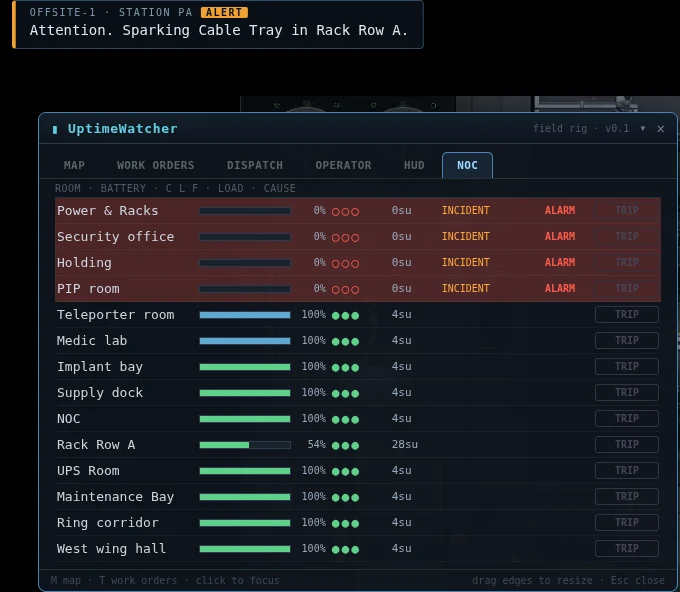
- The PA banner: the incident and the room, never a name.
- A room in alarm: its row flashes red, its battery is empty and its three channels are out.
- The cause word. INCIDENT here; the board never names a person.
The shift
The station runs in 2-hour shifts, starting on every even UTC hour. A shift has a number (Shift 4127 started 2026-10-21 00:00 UTC, and it goes up by 12 a day), a forecast, and a shape:
| Window | Minutes into the shift | What happens |
|---|---|---|
| Handover | From the start to 10 | The mess pass is the only event. The forecast is on the board. |
| Build | 10 to 100 | Faults, outages, flares and the rest. |
| Crisis | From 45, while a crisis event runs | The chip reads CRISIS. Otherwise it still reads BUILD. |
| Aftermath | 100 to 120 | No new events. Finish what is open. |
The shift chip shows the number, the forecast, the window and the time left. Hold the cursor on it for a second for the hover. Drag it where you like; right-click folds it to an icon and a time. An empty station skips the shift: no events and no report.
The forecast
Each shift is one of four. The forecast is read once, at handover, and it tells you how bad the shift is allowed to get.
| Forecast | How often | Worst it gets | Crisis needs | Crew bonus |
|---|---|---|---|---|
| Quiet | 30 % | Medium problems | Never | 0.8 × |
| Steady | 40 % | Large problems | Never | 1 × |
| Rough | 22 % | A crisis | 2 aboard, up to 1 a shift | 1.3 × |
| Red | 8 % | A crisis | 2 aboard, up to 2 a shift | 1.6 × |
The forecasts, as the PA and the NOC strip read them:
- Quiet: “Quiet shift expected. Small faults, light traffic. Do not get comfortable.”
- Steady: “Steady shift expected. A normal amount of things will go wrong.”
- Rough: “Rough shift expected. Power and coolant are watching you.”
- Red: “Red shift. Crisis conditions likely. All personnel to stations.”
Two rules limit the forecast. Red needs 3 aboard when the shift starts; fewer, and it reads Rough. And one player aboard caps every forecast at a medium problem (severity 2): the station does not hand a solo night worker a crisis.
Pressure, on the NOC strip: “Pressure: low”, “Pressure: building”, “Pressure: high”, “Pressure: critical”. It is never a number, on purpose: “Pressure never reads as a number. That is deliberate.” It is weather, not a countdown.
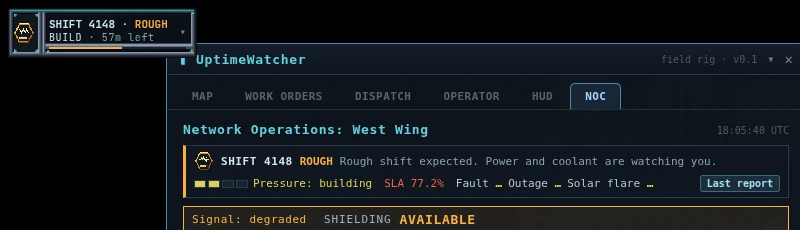
- The shift chip: the number, the forecast, the window and the time left. Hold the cursor on it for the hover.
- The forecast, with its line from handover.
- The pressure gauge. A word, never a number.
- The shift’s SLA against its target.
- This shift’s events. Each gets a tick when it is answered.
Events
The station breaks itself on a schedule the forecast sets. Each one is announced on the PA, and the long ones say when they are over. Here is what each is and what it asks. The long ones have their own procedure below.
| Event | What it is | The PA says |
|---|---|---|
| Fault | One ordinary incident, at the station’s pace instead of a timer’s. | The ordinary incident lines. |
| Mess pass | At handover, a cheap fault in each of 2 to 6 rooms (more crew, more rooms): light banks, drips, a stuck door. | “Attention. Handover mess in n rooms. Work orders are open. Maintenance Agent MA-1 will help after a short delay.” then “Handover mess is cleared.” |
| Outage | Up to 3 room breakers trip. With 3 or more aboard, 30 % of the time it is a bus segment instead. | The ordinary incident lines, one per breaker or segment, then “Power is restored. The fault has been logged. It was not asked for.” |
| Solar flare | The lights and doors misbehave for about 150 seconds. SF-515. | “Attention. Solar flare in sec seconds. Stay out of doorways. Engineers may raise shielding at the NOC.” |
| Clerical error | The work-order records go missing, and fixes stop paying. SF-516. | “Notice. Records are unavailable. Work orders will not pay until they are restored.” |
| Firmware storm | MA-1’s policy list is corrupted. SF-517. | “Attention. Corrupted firmware package in sec seconds. Maintenance Agent MA-1 is affected. Do not follow its advice.” |
| Surge storm | The Core surges 3 times in a row. SF-518. | “Attention. Core surge storm in sec seconds. Operators to manual. Raise coolant. Shed load.” |
A mess, an outage or a fault that you fix is called answered. One that you do not fix before the shift ends has “ran its course”, and the report says so. Nothing is held against a person for it.
The shift report
When a shift ends with anyone aboard, the PA reads “Shift shift is closed. SLA pct percent, band. The report is on the board.” (If no event ran: “Nothing happened. The report is short.”) The report card opens for everyone who was aboard and closes itself after 20 seconds; Last report on the NOC tab reopens it. It lists:
| Line | Reads |
|---|---|
| The forecast | “Forecast: temp” |
| The SLA | “SLA: pct% (band)”, target 95 % |
| Events | Each event and whether it was answered |
| Work orders | “Closed: players by crew, bot by MA-1.” |
| Outage causes | “station STATION · manual MANUAL TRIP · sabotage SABOTAGE” |
| Your line | What you did, and the bonus if you earned one |
The top 3 contributors are named on the NOC copy only. The card on your screen is anonymous.
Footer: “Filed at shift change. Nobody read it yet.”
Procedures
SF-511: Answer an alarm
- Read the alarm. Open UptimeWatcher, go to the NOC tab, and find the flashing row. The cause word tells you what kind of trouble it is (Engineering).
- Go to the room’s panel. Hold E at it and follow the incident (Engineering, SF-412).
- Fix the room before the clock runs out. A department alarm goes station-wide in 2 minutes, and at once if Facility is out. Fixing the channel that dropped is what clears it.
- Wait for the room to climb. The alarm clears only above 75 %, with all three channels back.
SF-512: Take a work order
- Anyone: walk to the incident and hold E. The ring shows others you are on it, and the incident is yours until you finish or leave. “name is already on it.” is what the next person reads.
- Engineer: open DISPATCH. Every open incident is a work order, WO-nnnn, under the station sector. Take its route and you claim it. A claim lasts 5 minutes and is kept warm while you are in the room or working it, and you can hold 2 at a time.
- Finish it. The ticket reads “Ticket closed: incident, room. +goldg, +xp XP, Station standing +standing.” Pay and the Engineer’s bonus are in Engineering.
SF-513: Read the shift report
- Open the NOC tab after the PA says the report is on the board, or wait for the card to open itself.
- Read your line at the bottom. “Your shift: n contributions. Crew bonus: amount credits and standing standing.”
- Reopen it later with Last report on the NOC tab. The card on the NOC shows the top 3 by name.
SF-514: Earn the crew bonus
- Be aboard for 15 minutes of the shift.
- Contribute at least once. A paid fix, a sabotage put right, a breaker reset, a door panel restored, a cold-start step, the records restored or MA-1 reflashed all count. Fixing your own work inside 15 minutes does not.
- Wait for the boundary. The bonus pays when the shift ends: gold and 1 Station standing. If you are offline, it is waiting at your next login.
- Know the size. A base of 40g (scaled by your level), times the SLA band (100 % if met, 60 % at risk, 30 % breached), times the forecast’s multiplier.
SF-515: Ride a solar flare
- Hear the warning. You have 60 seconds. The PA says it clean, and the NOC’s shielding control lights.
- Stay out of doorways. Hallway doors in the affected rooms swing on a random beat, and an access door only ever stutters shut. A door will not close on you, but it will stand in your way.
- Engineer, if you are on shift: raise shielding at a NOC board. Hold E at a NOC board, or press Raise shielding on the NOC tab. It takes 4 seconds, once a flare.
- When it passes, fix the light banks it blew. Between 1 and 3 are left, each as a work order. “The flare has passed. Light banks lost to it have work orders.”
SF-516: Restore the records
- Read the NOC banner: “RECORDS MISSING: work orders will not pay. Restore at the records terminal.”
- Go to the records terminal beside the NOC’s main board.
- Hold E for 12 seconds, or 6 as an Engineer. One person at a time: “Someone is already restoring the records.”
- Collect what you filed. Every fix made meanwhile pays on completion. “Order id paid on completion. The records caught up.”
SF-517: Reflash MA-1
- Read the red list. Hold L on MA-1, or open its panel. All 6 rows in red, and the footer: “POLICY LIST CORRUPTED. Reflash to restore.”
- Stand at MA-1’s dock, or at a NOC board, within 2 tiles. At the dock, MA-1 has to be near it.
- Hold E for 10 seconds, or 5 as an Engineer. One person at a time: “Someone is already reflashing MA-1.”
- Read the PA. “Maintenance Agent MA-1 has been reflashed. Its policy list is correct again.”
SF-518: Take the Core through a surge storm
- Read the forecast on the Core monitor. “SURGE STORM FORECAST: n surges, the first in mmss. Take it to manual.” You have 45 seconds.
- At the Core console, set MANUAL, raise coolant, and shed load (Engineering, The Core).
- Ride all 3. They come 40 to 60 seconds apart, each 1.6 times the surge it would have been. The console reads “SURGE STORM: surge i of n. Next in about mmss.”
- Read the all-clear: “The surge storm has ended. Core integrity is recovering.”
Decisions
Fix it, or let it ripen
Every incident has a timer, and the timer runs on time with players aboard, not wall time. A room nobody is in does not get worse; the station waits. That has two uses. First: if you want a quiet station, leave it, and nothing compounds. Second: the moment you or anyone else steps back aboard, every timer is running again, so do not leave a Coolant Drip open on your way out the door and expect it to be where you left it.
Between fixing and ignoring there is a third thing: MA-1. It waits 60 seconds of time aboard before it claims an order, and nobody is paid for its fixes (Engineering). Leave the light banks to it and spend your hands on the breaker, the segment and the rack.
Claim first, or fix fast
A claim stops everyone else from taking that order, for 5 minutes, up to 2 at once. That is the reason to take one only when you mean to fix it: the lease stays warm while you stay in the room or work it, and it lapses when you log out or lose the Engineer implant. A claim also keeps MA-1 off the order.
The forecast is a map
Read it at handover. Quiet means no crisis and nothing large, so it is the shift to go and rewire the racks. Steady is the station’s idea of a normal afternoon. Rough and Red put a crisis on the table in the second half, with 3 aboard needed for Red. A crisis event needs a minimum crowd (rows in Readings), which is why a solo shift never has one.
What it does not tell you is when. Pressure is the only hint, and it is the station’s mood, not a timer.
More crew, more trouble
A bigger crowd and a better-built station (more modules running, more rooms online, better rack parts) make a busier shift. A shift only gathers trouble while someone is aboard, so an empty station is a quiet one. The crew bonus is not scaled by the crowd; it is scaled by the forecast and the SLA band (SF-514).
The flare: shield it, or live with it
Shielding halves the flare’s remaining time, and costs the Core 15 units of output until it is over (“Shielding is raised. The flare will pass sooner. Core output is reduced until it does.”). Do it in the warning, and the flare itself comes up short. Not shielding costs nothing now and ends the same way: 1 to 3 light banks blown, and work orders to go with them.
Two details are fair game. The medic lab and the teleporter room never flicker, so they are the place to sit it out. And a flare garbles the PA on purpose; the warning is always clean, but “This is normal” is the station’s opinion.
Storm: reflash, or wait
You may reflash for 10 seconds, or let the shift boundary heal MA-1 on its own. The boundary heals it and the PA says so: “Maintenance Agent MA-1 has restored its own policy list at shift change. It would like that noted.” The cost of waiting is the storm’s actions. While corrupted MA-1 may strip a fixture from a room, and it logs that as FIRMWARE, not as anybody’s sabotage. It never strips or touches a fixture a player is working, so standing on the job protects the job. A fixture it stripped is salvage, and it goes on the parts shelf (Engineering).
A reflash is also a contribution toward the crew bonus (SF-514). A storm is worth 2 to 3 wrong rows and needs 2 aboard.
The records: fix first
While the records are missing, a fix pays nothing yet. It is held, not lost. Restoring pays every held order at once to whoever is online, with the Engineer’s bonus. And if nobody restores them, the shift boundary brings them back anyway and releases the pay. So you do not need to panic about the money. What you lose by waiting is MA-1: it drops its job, walks home and idles at its dock, so the cheap end of the board is yours. Restoring them is also a contribution.
The anti-farm rule still holds: a ticket on your own sabotage is never held, because it never paid in the first place.
The surge storm: the one job that counts
A storm is 3 surges at 1.6 times the usual, back to back, and the Core’s ordinary surges are paused for the duration. An operator in manual with the coolant up rides it; an unattended Core can trip. If the Core trips, the storm ends not answered, there is no all-clear on the PA, and the trip has its own line. Do not leave the console to fix a light bank.
What carries over the boundary
Strikes reset (Security and Holding). A pending review does not. Open work orders do not either: an incident you left open is still open next shift, with its timer. Events in flight end there, not answered; the records come back; MA-1 is healed; the door panels reshuffle (Engineering). The forecast is rolled again.
Who’s watching
- The PA. Every incident and every escalation. It says the room, never the name.
- The NOC board. The alarm, its cause word, the SLA and the shift strip. Everyone aboard may read it.
- The shift report. Whether the event was answered, who closed how many orders, and what caused the outages (STATION, MANUAL TRIP, SABOTAGE). Names are on the NOC copy for the top 3 only.
- The panel logs. A storyteller outage is logged under STATION, a firmware strip under FIRMWARE, a person under their name (Engineering).
- MA-1. It reports what it did and when, and its inspect card shows the red list during a storm.
- The storyteller itself. Never named in the game, and never blamed on a person: it is the station breaking.
Bring
| Bring | Why | Checked |
|---|---|---|
| The Engineer implant | Half the hold time, DISPATCH, shielding in a flare | |
| Parts from the station shelf | A flare blows light banks, and a fixture fix uses parts (Engineering) | |
| A friend | Red needs 3; a surge storm is easier with a second operator | |
| Patience for a clerical error | Fixes are held, not lost |
Procedure SF-610 · Medic Lab
Medical
Dying aboard the Station is allowed. You wake up on a bed in the Medic Lab with a fault, and the fault wears off by itself. A medic can make it go sooner and will be paid for it. This packet is for the person on the bed and the person standing next to it.
Readings
The fault
Every death that sends you to the lab leaves exactly one fault, named after the crash report’s family. A new death replaces the old fault. The size of the fault depends on the killing blow: below 25 % of your max HP is SEV-3 MINOR, from there to 60 % is SEV-2 MAJOR, and 60 % or more is SEV-1 CRITICAL. A hit older than 2 seconds when you died (a bleed, say) counts as the smallest.
| Severity | Lasts |
|---|---|
| SEV-3 MINOR | 2 minutes |
| SEV-2 MAJOR | 4 minutes |
| SEV-1 CRITICAL | 6 minutes |
The clock runs while you are logged out. None of the 4 touches movement.
| Fault | Family | What it does | Smallest | Middle | Worst | Treated by |
|---|---|---|---|---|---|---|
| Pattern Misalignment | Hardware | Max HP | -10 % | -20 % | -30 % | Chassis Realignment |
| Thermal Drift | Thermal | Stamina regeneration | -20 % | -40 % | -60 % | Coolant Flush |
| Bit Rot | Corruption | Healing received | -20 % | -35 % | -50 % | Checksum Scrub |
| Packet Loss | Signal | Gadget cooldowns | +15 % | +25 % | +40 % | Link Resync |
Each fault’s status line, as the buff bar shows it:
- Pattern Misalignment: “Your pattern came back a few microns off true. Max HP reduced until it settles.”
- Thermal Drift: “Heat (or the lack of it) came through the buffer with you. Stamina recovers slower.”
- Bit Rot: “Corrupted blocks rode the transport in with you. Healing restores less.”
- Packet Loss: “Parts of your pattern arrived late. Gadget cooldowns run longer.”
Bit Rot cuts every heal: medkits, lifesteal, healing mist, the repair drone, party heals and resting.
On waking: “You re-materialise on a bed in the Medic Lab. fault, sevLabel. It wears off in timeLeft, sooner if someone treats it.” When it ends by itself: “fault cleared on its own. Nobody filed a ticket, but it is closed.”
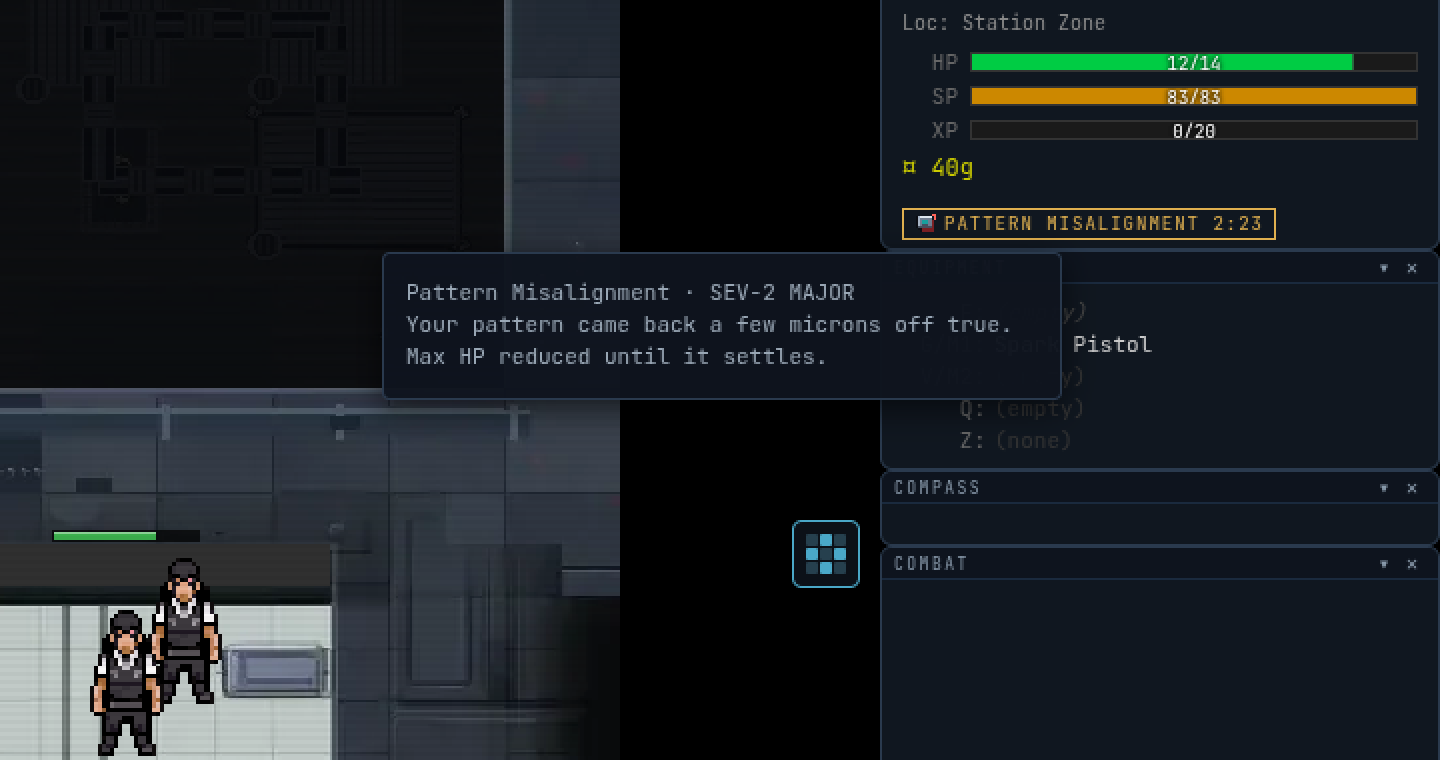
- The fault tag: the fault’s name, with its family’s icon.
- The severity word. It sets how long the fault lasts and how hard it bites.
- The time left. It runs while you are logged out too.
- The patient, within a tile of bed 1.
The Patient Scanner
A medic with the Medical implant gets the Patient Scanner panel in the station. It reads whoever is on the nearest bed.
| Row | What it tells you |
|---|---|
| PATIENT | Who, or — no one in range — |
| HP | Their HP over their max |
| FAULT | The fault, or NONE |
| SEVERITY | The severity word, or -- |
| TIME LEFT | Minutes and seconds, or -- |
| TREAT WITH | The treatment that matches the fault, or -- |
The corner tag says where the patient is in the process.
| Tag | Means |
|---|---|
| NO TARGET | Nobody in range |
| WITHIN SPEC | A patient with no fault. Nothing to treat. |
| FAULT FOUND | A fault. The scanner has a recommendation. |
| BOT TENDING | RA-1 has claimed the patient |
| SETTLING | Treated a moment ago. Give it 30 seconds. |
| SUPPLIES OUT | The cabinet has no kit. See Supplies. |
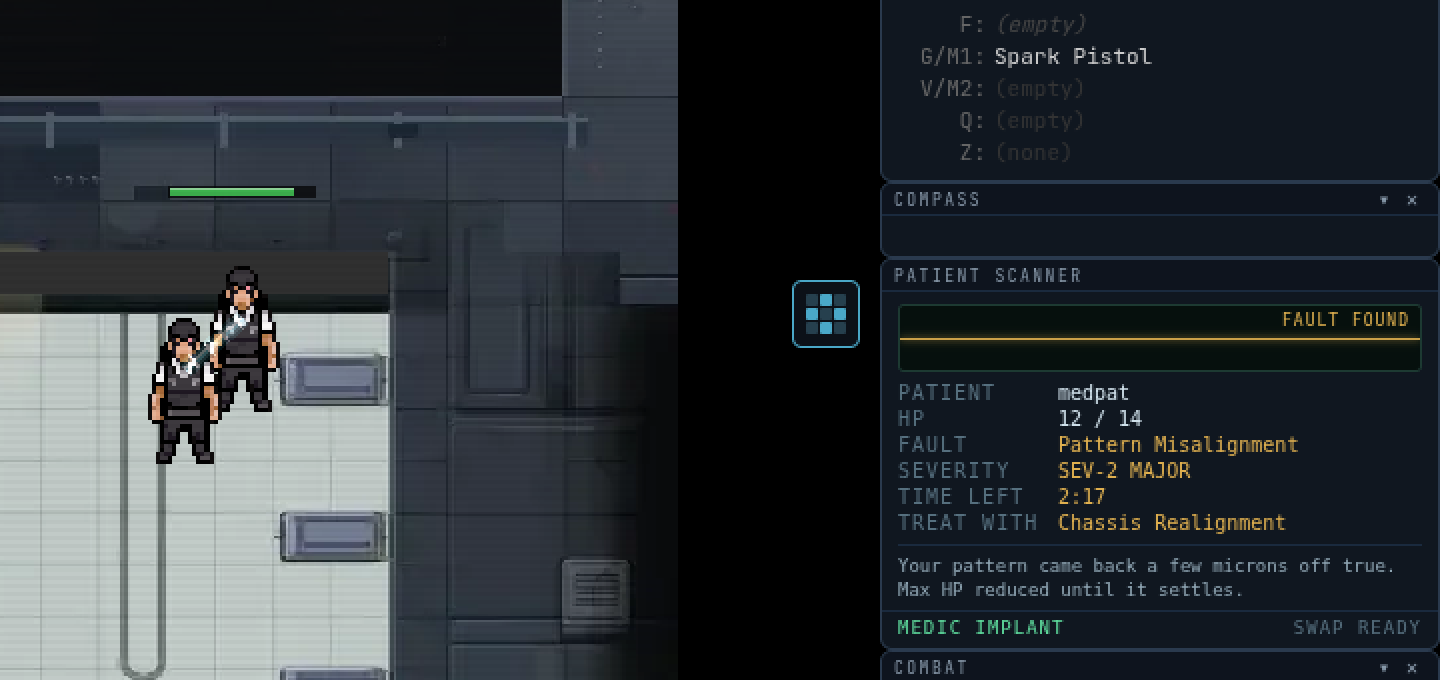
- The corner tag. FAULT FOUND: there is something to treat.
- FAULT: what the patient woke up with.
- TREAT WITH: the treatment that holding E at the bed will run.
- The patient on bed 1.
Well-patched
The reward for being treated properly: “A medic signed off on your pattern. You run slightly better than spec for a while.” It is +10 % max HP for 5 minutes. A second treatment renews it; it never stacks. It ends the moment you die. Max HP is headroom, not a heal.
RA-1
“Station recovery firmware in a chassis. Speeds up recovery and tops up HP. Does not diagnose, prescribe or have opinions.” It does three things.
- Tops up HP by 25 % of your max each tend, with Bit Rot scaling that.
- Speeds up the fault. Each 4 second tend takes 10 seconds off it (2 times as fast while you stay on the bed). A tend is followed by a 6 second pause. When the last tend finishes the fault, RA-1 closes the ticket: “fault is clear. Closing your ticket.”
- Announces arrivals. “RA-1: Patient inbound. name, fault, sevLabel.”
It never clears a SEV-1 CRITICAL: those get HP only. “RA-1: name arrived at SEV-1. I can keep them comfortable. A medic can fix it.” It never picks a treatment, and it never gives Well-patched.
Supplies
A treatment that grants Well-patched takes a Medical Supply Kit from the lab’s supply cabinet. When the cabinet has none, the fault is still fixed and the medic is still paid, but the patient gets no Well-patched and the scanner reads SUPPLIES OUT. The cabinet is refilled by a standing order with the warehouse, and it costs nothing to the medic. When it has run low the notice goes out: “STATION NOTICE: The Medic Lab at Offsite-1 is out of supplies. Treatment is limited to optimism. The warehouse has the order.”
RA-1 takes a Saline Pack for its first tend of each fault. With no saline it still tends, HP only, and says: “RA-1: Out of saline. I can still do the bandage. The bandage is not the saline.” The warehouse crew fills that order; see Receiving and the dock.
Procedures
SF-611: Wake up and read the fault
- Look at the HUD. The fault tag shows the family; hover the buff bar for the status line and the time left.
- Check the severity word. It sets how long you wait and how much it hurts.
- Decide whether to stay. The lab is not a toll gate, and the game says so: “You are leaving the Medic Lab with fault. That is allowed. It wears off wherever you are.”
SF-612: Get treated
- Lie on a bed. You must be within 1 tile of it.
- Ask a medic, or wait for RA-1. If a medic is aboard, they will see you on the scanner.
- Stay on the bed for the 4 seconds the treatment takes. If you step off, nothing is applied and nothing is paid: “Treatment interrupted. Nothing was applied.”
- Read the log: “medic cleared your fault. Well-patched.”
SF-613: Treat someone (Medical implant)
- Get the Medical implant at the implant terminal. Swapping costs a 60 second cooldown.
- Stand within 2 tiles of the bed. The patient must be within 1 tile of it. You cannot treat yourself.
- Read the scanner. If TREAT WITH has a treatment, that is the one.
- Press and hold E at the bed. It runs the treatment the scanner recommends, for 4 seconds.
- Do not move more than a tile. If you do, or the patient leaves the bed, nothing is applied and nothing is paid.
- Read your log: “Ticket closed: name, fault. +goldg, +xp XP, Station standing +standing.”
Refusals, in the order they are checked: “Treatment beds need a Medical implant.” / “Treatments run at a bed. Get the patient onto one.” / “name’s pattern is within spec. Nothing to treat.” / “name was treated a moment ago. Give the pattern time to settle.” / “treatment does nothing for fault. The scanner recommends recommended.”
SF-614: Leave it to RA-1
- Do nothing. RA-1 is the lab’s Recovery Agent and tends patients on its own.
- Stay on the bed. It tends in 4 second passes and needs you there for each.
- If you press E at the bed with a fault and no medic, it answers: “I can make this faster. I cannot make it go away. A medic can.”
Decisions
Wait, or be treated
Doing nothing is a legitimate answer. The fault lasts at most 6 minutes and costs you a stat, never your movement. Treatment is faster, and each family treatment has a price that the patient pays, not the medic:
| Treatment | Treats | Hold | What it costs the patient |
|---|---|---|---|
| Chassis Realignment | Hardware | 4 seconds | “Pulls a misaligned pattern back to true. You will feel it in your stamina for a minute.” |
| Coolant Flush | Thermal | 4 seconds | “Flushes heat drift out of the pattern, and a little of your HP goes with it. Max HP dips for a minute.” |
| Checksum Scrub | Corruption | 4 seconds | “Rewrites bad blocks from the last clean copy. Do not run it twice in ten minutes: the second dose is the problem.” |
| Link Resync | Signal | 4 seconds | “Resends every lost packet in one burst. The burst is paid for out of your stamina.” |
- Chassis Realignment halves your stamina regeneration for 60 seconds.
- Coolant Flush takes 10 % off your max HP for 60 seconds.
- Link Resync sets your stamina to empty.
- Checksum Scrub has no cost until it is run twice. A second scrub on the same patient inside 10 minutes is an overdose. The fault becomes Bit Rot, SEV-2 MAJOR, the medic is not paid and you get no Well-patched: “Second Checksum Scrub inside its window. The scrub has started rewriting good blocks.”
So a Resync is worth it when you are about to stand still anyway, and a Realignment is worth it when you are not about to run. A Flush costs the max HP you were about to fight with. What you get back is Well-patched: 10 % more max HP than you started with, for 5 minutes.
The chemistry route
Four vials in the Chemistry packet clear a fault without the lab and without a medic: Burn Gel (Thermal), Defrag Tonic (Corruption), Signal Booster (Signal), Hardware Patch (Hardware). They clear only their own family. They give no Well-patched, pay no medic, and cost a vial’s worth of ingredients. A Defrag Tonic is also the way around an overdose: the tonic has no scrub window. See Chemistry.
Which patient
A medic is paid for the same patient at most once every 10 minutes. A second treatment inside that window still works, and the line reads +0g, +0 XP, Station standing +0. A fault only comes from a death, so a patient cannot be re-treated for pay without dying again. The honest play is the patient who has just arrived, the worst severity first.
A busy lab sorts itself. RA-1 skips a patient a player medic is already standing next to (within 2 tiles). When a Medical implant comes aboard it announces: “RA-1: Medic on shift. Handing over the queue.”
What a medic earns
A cleared fault pays 16 gold and 20 XP at the base, scaled by your level and by the world the way every ticket is, plus 5 Station standing out of 100. XP moves with the world, so do not treat a printed number as a promise. Only a cleared fault pays. An overdose pays nothing.
Who’s watching
- The whole station. Arrivals are announced to everyone aboard. A critical one gets its own line.
- RA-1. “RA-1: No medic on shift. Recovery will run at standard speed. Thank you for your patience.”
- The scanner. Medics see every patient’s fault, severity and time left. Patients are not asked.
- Your Station standing. A cleared ticket adds to your sector standing for the Station, which stops at 100.
Bring
| Bring | Why | Checked |
|---|---|---|
| The Medical implant (medic) | The key to the bed and the scanner. Nothing else treats. | |
| A free hand and a minute (medic) | The hold takes 4 seconds and one step cancels it. | |
| Nothing (patient) | You wake with your gear. Patients are charged in stamina or max HP, not in items. | |
| A Defrag Tonic, if you carry one | For Bit Rot, and the way past a second scrub. | |
| Patience | The fault is at most 6 minutes. RA-1 shortens it, and the clock keeps running while you read this. |
Procedure SF-710 · Chemistry
Chemistry
Vials, a shaker, a microwave and a fridge turn the things that fall off monsters into things that help or hurt. Every product is something you worked out. The grid at the top of the inventory says so itself: “Nothing is listed. Everything is earned.” This packet tells you where the machines are, how to learn without wasting a bag, and what is polite to throw at a colleague.
Readings
Substances
Substances are the ingredients. They stack in a Substances tab in the inventory once you hold one. They have no sell price, cannot be equipped and cannot be quick-used. Each has its own colour in its vial.
| Substance | Kind | What the game says |
|---|---|---|
| Coolant | Base | “Blue, cold, and technically not a beverage. Rendered from fridge-type creatures.” |
| Thermal Paste | Base | “Silver-grey and smeared on everything that runs hot. Rendered from blinking, humming things.” |
| Toner | Base | “Black powder that gets everywhere except the page. Rendered from fax phantoms and label wraiths.” |
| Caffeine Extract | Base | “Brown, bitter, and the only thing keeping three departments upright. Rendered from coffee golems.” |
| Electrolyte | Base | “Lime green. Tastes like a sports drink that has seen things. Rendered from gym equipment.” |
| Isopropyl | Base | “Clear. Cleans screens, keyboards and, reportedly, decisions. Rendered from Roombas and mouse jigglers.” |
| Adhesive | Base | “Amber and tacky. The reason the tape spider always wins. Rendered from tape, labels and boxes.” |
| Polymer | Base | “Milky white packaging, liquefied. Rendered from shrink wrap, pallets and boxes.” |
| Copper Slurry | Base | “Orange and conductive. Do not stir with the metal spoon. Rendered from cable creatures.” |
| E-Waste Slurry | Base | “Toxic yellow. Whatever the recycling bin has been hiding. Rendered from shredder things.” |
| Raw Data | Base | “Glowing green, unformatted, unbacked-up. Rendered from software bugs.” |
| Slag | Rare | “What is left once something has been thoroughly decommissioned. Found in magma zones.” |
| Brine | Rare | “Salt water with a history. Found in the flood and the abyss.” |
| Sap | Rare | “Sticky, sweet, and not on any approved vendor list. Found in the jungle.” |
| Crystal Dust | Rare | “Glittering grit from the caves. Sparkly, and bad for lungs and warranties.” |
| Rift Ichor | Rare | “Something leaks from the rifts. Facilities has opened a ticket. It is still open.” |
| Ozone | Made | “The smell of a machine working too hard. A made substance; an ingredient, not a snack.” |
| Solder | Made | “Liquid metal with a flux problem. Joins things permanently, unlike our contracts.” |
| Magic Smoke | Made | “Every circuit runs on it. When it escapes, so does the circuit.” |
Where they come from
- The shredder. Carry a creature or a box to it and it grinds out units by species. A creature gives a substance from its family: a Coffee Golem gives caffeine extract, a Label Wraith gives toner and adhesive. Boxes give polymer and adhesive. See the shredder in Receiving and the dock.
- Samples. A kill in a zone has a 12 % chance to drop a sample of that zone’s substance, straight into the bag, and the log says so: “Sample: n substance from creature.” A zone rare (slag, brine, sap, crystal dust) has a 3 % chance, and a boss 25 %.
- Bosses and breaches. The bosses of the rifts and the wardens of a breach drop rift ichor.
- The microwave and the shaker themselves. Ozone, solder and magic smoke are made substances. They are ingredients, not snacks.
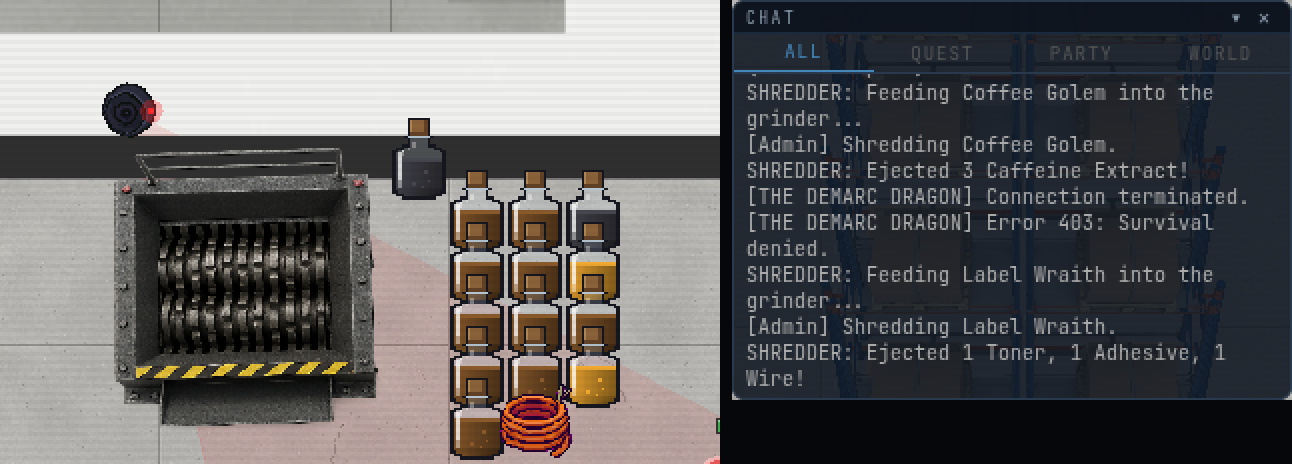
- The chute. Whatever goes in comes out as units, by species.
- The vials on the floor: caffeine extract from the golem, toner and adhesive from the wraith. Walk over them.
- The log line names what came out, substances first.
The three machines and the fourth
| Station | Where | How long | What it is for |
|---|---|---|---|
| Shaker (the MIX tab) | In your inventory | 2 seconds | Cold, no-heat mixes. Pick two or three. |
| Microwave | The vendor’s, on the warehouse floor | 12 / 10 / 7 seconds at LOW / MED / HIGH | Anything that needs heat |
| Fridge | Next to the microwave | 6 seconds | Anything that wants to be cold |
| Flash-cool | The microwave then the fridge | 10 seconds to cross | A product that is only made if you are quick |
The dial tooltip is “Power. Higher is faster, and louder.” The fridge prompt is “[E] Open fridge”. The shake panel says “Pick two or three.” Only one person uses the fridge at a time: “Someone is already cooking. Join the queue, or the ticket.”
The Recipe Grid
The GRID tab, beside MIX, is the catalogue of everything the game has taught you. One square per recipe, in 6 rows.
| Row | Tagline |
|---|---|
| Boosts | “Productivity, chemically.” |
| Medical | “For faults the help desk cannot ticket.” |
| Throwables | “Escalation by other means.” |
| Engineering | “Fixes, and things that fix themselves.” |
| Materials | “Ingredients with ambition.” |
| Oddities | “Filed under: unclear.” |
| Square | What it tells you |
|---|---|
| Empty, dark | “Undocumented.” You know nothing. |
| Faded ingredient icons | “Hinted. Ingredients seen, method unknown.” |
| The product’s icon | Known. The card shows the inputs, the method and the effect, and a Make button. |
| Padlocked | Belongs to a department the Station does not have. Skip it. |
The counter reads n / total discovered. A square that has never been found on this server reads “Undiscovered on this server.” and one someone else found first reads “First discovered by name. You haven’t.”
- Known: the product’s icon. Click it for the card and Make.
- Hinted: faded ingredient icons. The ingredients were seen, the method was not.
- Undocumented: nothing yet.
- The counter: what you have discovered out of the whole grid.
Products
20 products at the time of writing. Each is one of 5 forms: drink, inject, patch (on yourself), throw or spray (at somebody or something).
| Product | Form | Family | What the game says |
|---|---|---|---|
| Energy Drink | Drink | Boosts | “Drink. +60 stamina, faster stamina regen 30s. Two inside 20s and your heart objects.” |
| Overclock Shot | Inject | Boosts | “Inject. Gadget cooldowns 40% faster for 20s. A second shot locks them up.” |
| Burn Gel | Patch | Medical | “Patch. Heals 25% and clears the Thermal fault (Thermal Drift).” |
| Smoke Charge | Throw | Throwables | “Throw. A thick cloud; enemies inside lose track of everyone.” |
| Cryo Grenade | Throw | Throwables | “Throw. A freezing cloud: enemies inside freeze (shock or beam them to shatter). Chills players.” |
| Sticky Goo | Throw | Throwables | “Throw. A splash of goo; everything standing in it is slowed.” |
| Slag Charge | Throw | Throwables | “Throw. Burning ground for 6s. Hurts whoever stands in it.” |
| Healing Mist Vial | Throw | Medical | “Throw. A cloud of healing mist; everyone inside heals.” |
| Bottled Magic Smoke | Throw | Oddities | “Throw. The smoke that leaves electronics. Gadgets stutter, everyone coughs.” |
| Corrosive Spray | Spray | Throwables | “Spray. A cone of acid mist: corrodes enemies (fire melts them down, cold dissolves).” |
| Fire Suppressant | Spray | Engineering | “Spray. Puts out burning things and burning ground.” |
| Cold Brew | Drink | Boosts | “Drink. +80 stamina. Smooth: no crash.” |
| Hiccup Juice | Drink | Oddities | “Drink. Does nothing useful. You will hiccup for three minutes.” |
| Defrag Tonic | Drink | Medical | “Drink. Clears the Corruption fault (Bit Rot).” |
| Signal Booster | Inject | Medical | “Inject. Clears the Signal fault (Packet Loss).” |
| Hardware Patch | Patch | Medical | “Patch. Clears the Hardware fault (Pattern Misalignment).” |
| Saline Drip | Drink | Medical | “Drink. Regenerates 1% HP per second for 30s.” |
| Foam Canister | Throw | Throwables | “Throw. A wall of expanding foam across the corridor for 20s; anything caught in it is stuck.” |
| EMP Cloud | Throw | Throwables | “Throw. A crackling cloud; machines and bots inside are stunned 5s.” |
| Rift Tonic | Drink | Oddities | “Drink. Tastes like elsewhere.” |
What the machine tells you when you are wrong
A wrong mix costs no ingredients and writes a line. The lines are the lessons.
| You get | It means | The game says (one of three each) |
|---|---|---|
| Heat | Right ingredients, not enough heat | “It needs heat.” / “Nothing happens. Perhaps try the microwave.” / “Lukewarm. It wants more than lukewarm.” |
| Too hot | Right ingredients, too much power | “It’s smoking. Too hot.” / “The mixture scorches. Lower the power.” / “That was meant to be warmer, not weaponised.” |
| Cold | Right ingredients, wrong temperature, or the wrong machine | “It wants to be cold.” / “Sluggish and cloudy. Try the fridge.” / “Too warm. It needs to settle down.” |
| Missing | The set is almost there | “Something’s missing.” / “It nearly worked. Something is not in the room.” / “Two thirds of a plan.” |
| Fizzle | Nothing in that combination | “A small grey fizzle. The mixture is unimpressed.” |
A near-miss marks the recipe as hinted on your grid and the square flickers. A fizzle teaches nothing, and a few recipes are never hinted at all, so a fizzle is not proof that nothing is there.
Procedures
SF-711: Shake a mix
- Open the MIX tab. Pick two or three different substances.
- Press Mix. The shaker runs for 2 seconds: Shaking...
- Read the line. A make puts the product in your bag; a near-miss spends nothing.
- Walk away and the panel closes. A mix that was already sent carries on.
SF-712: Cook in the microwave
- Stand within range of the vendor’s microwave and open it. Put each ingredient in a slot. Set the amount under each slot.
- Set the power dial: LOW, MED or HIGH. Click cycles it.
- Start the cook. A near-miss refuses before anything is taken.
- The product arrives in your bag. The batch is as many times as the scarcest ingredient allows, up to 10. What is left stays in the bag.
SF-713: Chill in the fridge
- Stand within two tiles of the fridge and press E: “[E] Open fridge”.
- Fill the slots. Press Chill. It runs for 6 seconds and holds your ingredients for that time.
- The product arrives in your bag. A fridge job is saved: if the server restarts, the ingredients are given back.
SF-714: Flash-cool
- Cook the row that asks for it at the microwave as usual. It makes its ordinary product, then a ring appears over you: COOL IT: ss.
- Get to the fridge inside 10 seconds. Everyone nearby can see the ring and the clock.
- Use the fridge’s flash-cool. In time: “Frost cracks across the vial. Flash-cooled.” Too late: “Too late. It cooled the ordinary way.” and the ordinary product stays.
SF-715: Make from the grid
- Open the GRID tab and click a known square.
- If the Make button is lit, press it. It opens the right machine with the slots filled in.
- If it is grey, the reason is on it: “Wrong station.” / “Missing ingredients.” / “Station busy.”
- At the machine, press the machine’s own button. Make fills the slots; it does not start the run.
SF-716: Throw or spray a product
- Put the product on the quick-use slot.
- Aim with the cursor and press Q. A throw lands where you aim, up to 6 tiles, and stops at the last tile you can see. A spray is a cone 3 tiles long.
- A drink, inject or patch uses itself on you, ignoring the aim.
SF-717: Read a recipe note
- Find a note. It is an item: “A note in someone else’s handwriting. Read it to learn the recipe.”
- Use it. The note is spent; the recipe is learned and the square is filled.
- Use a note for a recipe you already know and it stays in your bag.
Decisions
Learning cheaply
The cheapest way to learn is to fail on purpose. A wrong mix costs nothing, the machine tells you which of five things went wrong, and the grid remembers what you saw. Run the lines in the table above in order: add heat before you add ingredients, and add ingredients before you give up on a pair. A square you have never seen is not a square you cannot get; it is a square nobody has hinted to you yet.
Three other routes:
- Watch. If you are within 4 tiles of someone making a thing you do not know, you get the hint for it, and a toast: “You saw name making something. Check the grid.”
- Notes. A kill can drop a recipe note: 1 % in a zone, 2 % in a tunnel, 25 % from a boss. It reads as a scrawl, never a list. Example: “Brown, brown, blue. Leave it in the fridge. Do not forget it again.”
- Be first. The first fresh discovery of a recipe on the server scores 50, a banner for everyone, and your name on that square for good: “+n score. For documentation.”
Pushing the microwave
Power is time, and it is risk. HIGH cooks in 7 seconds against 12 on LOW. Some recipes cannot stand HIGH. A row cooked above its limit loses half its batch (rounded down, so a batch of one comes to nothing) and a cloud of magic smoke escapes: “Magic smoke escapes. Half the batch goes with it.” There is a 20 % chance that the smoke leaves a vial behind: “A vial of magic smoke floats loose.” So overheating on purpose is a way to farm a throwable, at the price of the batch. It is not a recipe. It is a reflex.
Which products to carry
Carry what you will use before you die. The honest breakdown:
- Boosts pay in stamina and cooldowns and have a price on a second dose, below.
- Medical vials clear a fault without the lab, see Medical. Burn Gel heals as well.
- Throwables are crowd tools. Smoke makes enemies lose aggro. Cryo freezes, and a shock or a beam on a frozen enemy shatters it. Slag burns the floor. The EMP Cloud is the one that stops machines. Foam is a wall.
- Engineering vials put out fires. The Fire Suppressant puts out a burning microwave too, which ends the vendor’s rage.
Overdose
A second dose of the same group inside its window works, and then it costs you. The Energy Drink and the Overclock Shot are the two that bite. A second Energy Drink inside 20 seconds gives you Jitters, which halves your stamina regeneration for 10 seconds. A second Overclock Shot inside 30 seconds locks your gadgets for 10 seconds. The game says: “You’ve taken too much. Your pulse files a complaint.” and, at the end, “Your pulse settles. Nobody saw anything.” Cold Brew has no overdose, which is the entire point of Cold Brew.
How big a thrown thing is
A cloud is a circle, a splash is a puddle on the floor. Both hit everyone inside every half second to second, and both are capped: radius 3 tiles at most, 10 seconds at most. You may have one cloud and one splash out at a time; a new one of the same kind ends the old. They also end if you die or log off.
| Area | Shape | Radius | Lasts |
|---|---|---|---|
| Smoke Charge | Cloud | 2 tiles | 8 seconds |
| Cryo Grenade | Cloud | 2 tiles | 6 seconds |
| Magic Smoke | Cloud | 2 tiles | 6 seconds |
| Healing Mist | Cloud | 2 tiles | 8 seconds |
| Sticky Goo | Splash | 1 tiles | 8 seconds |
| Slag Charge | Splash | 1 tiles | 6 seconds |
| Foam Canister | Splash | 1 tiles | 20 seconds |
| EMP Cloud | Cloud | 2 tiles | 6 seconds |
The Foam Canister is a wall of 3 tiles across your throw that lasts 20 seconds. It sets solid only when nobody is standing in it, so nobody is ever sealed inside: whoever is caught is stuck until they step out, and then the gap closes.
Hitting a colleague
Your own chemicals always reach you. A chemical reaches another player only where PvP is allowed: not in a safe zone, not in a tunnel, not in another zone, not through spawn protection and not a party member. Damage goes through the ordinary PvP rules, so it costs you score and a kill is a PvP kill. The game tells the victim: “Caught in thrower’s product.”
Aboard the Station
Chemistry is legal aboard. The same limits apply, plus the medic lab, which is a safe zone. A chemical that damages another player does a share of their max HP each tick, not yours: 4 %, up to 15. It ignores the thrower’s level and gear, so a level 10 and a level 292 are equally dangerous and equally squishy.
Who’s watching
- Security. On the Station, a landed chemical hit tags you AGGRESSOR for 30 seconds, and “Chemical harm to a player” is a chargeable act worth 3 minutes of review. See Security and Holding.
- The evidence locker. At booking, thrown and sprayed products (throw and spray) go into the locker with the rest of your kit.
- The log. Every throw is written down with the thrower and the maker. Traded or looted units read unknown for the maker.
- The server. A recipe first is a banner: “name discovered Product. A first on this server.”
Bring
| Bring | Why | Checked |
|---|---|---|
| Two or three different substances | The shaker takes nothing else. | |
| Spares of whatever you have | A cook uses as many as the scarcest ingredient allows, and the surplus stays with you. | |
| A free quick-use slot | Q throws or sprays; a product in the bag does nothing. | |
| A recipe note, if you have one | It is a free square and a hint at the same time. | |
| The route to the fridge, memorised | Flash-cool is 10 seconds. | |
| A Fire Suppressant | For the microwave, when it goes. |
Procedure SF-810 · Security and Holding
Security and Holding
Aboard the Station you can hit another player, and the Station keeps a record of it. This packet is what is free, what costs a strike, how a review works, how to shorten one, and what an officer does about it. It is also the packet that says plainly what the rules are, so nobody has to find out by being booked.
Readings
The tag
Hit a player aboard and the hit marks you AGGRESSOR over your head for 30 seconds, unless the hit was free. A ring counts the tag down. Anyone aboard may hit a tagged player back for free.
Tag card: “Marked for starting it. The station is disappointed, not angry.”
Strikes and the ladder
A tag is a strike. Strikes are kept for this shift (12 at most are remembered). What a new strike does depends on how many you already have:
| Strike | What happens |
|---|---|
| 1 | A warning. No review. SD-9 barks, its lamp goes amber for a moment, and you get: “Warning logged. Strike 1 of this shift. The next one books you.” |
| 2 | A review is pending: 2 minutes. |
| 3 | A review is pending: 5 minutes. |
| 4 and up | A review is pending: 10 minutes. |
A pending review is not served yet. It only ever grows, never shrinks, and it stays through logout and the end of the shift. The strikes themselves reset when the shift ends. With no storyteller running, a strike lapses after 2 hours instead.
At strike 2: “Strike 2. A review is pending. SD-9 is on its way.”
SD-9’s lamp
| Lamp | What it means |
|---|---|
| Amber | A warning, or SD-9 is watching someone in the welcome grace. |
| Red | SD-9 is locked on and hunting. |
| Purple | A firmware storm is on and SD-9 may be wrong. |
Lamp card: “Amber: first offence.” “Red: locked on.” “Purple: a firmware storm; may be wrong.”
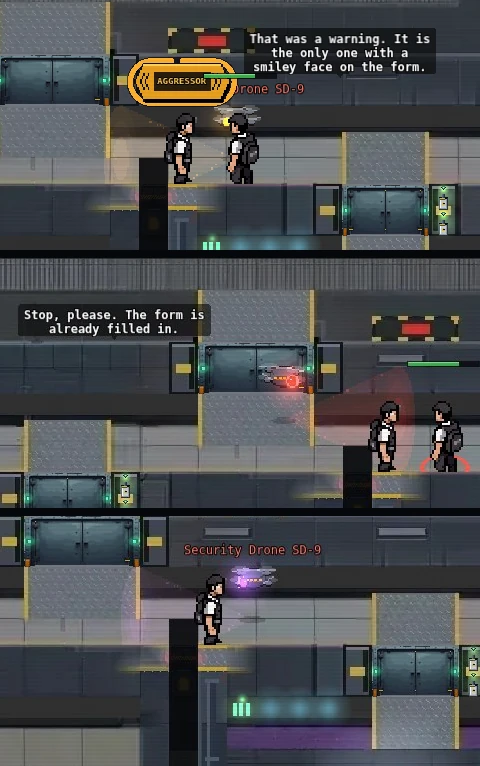
- The AGGRESSOR tag over the player who started it. The ring counts it down.
- Amber: a warning. It goes back to normal after a moment.
- SD-9’s speech bubble. It says what it is doing.
- Red: locked on and hunting.
- The lock-on ring closing under the player SD-9 is after.
- Purple: a firmware storm. SD-9 may be after the wrong person.
The wing
Three rooms behind the Security door: the office (the booking desk, the records terminal, the board), Holding (4 cells and an overflow bench, with a wall clock showing every review), and the PIP room.
Bench card: “For when Holding is full. Still Holding, only with a cushion.”
Desk card: “Everyone passes through here eventually. It has very good hours.”
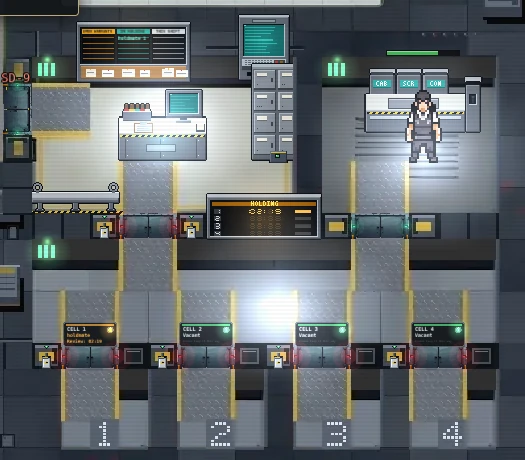
- The board: who is in Holding.
- The booking desk.
- The Holding wall clock: every cell’s remaining time.
- The PIP room and its sorting bench.
- A cell door’s card: who is in it and for how long.
Your own review
Once you are booked you see a banner with the clock: “IN REVIEW. mm:ss remaining. You may talk, emote and read mail. That is the programme.”
| In review you can | In review you cannot |
|---|---|
| Talk, emote, read mail | Attack, use gadgets, use items, use devices, or leave through the teleporter |
The clock runs only while you are online, aboard, alive and in your place (your cell, the bench, or the PIP room). Log out and it pauses; restart the server and it keeps your time. Dying in Holding or boarding again seats you back in your place; neither is an escape.
Your kit goes into the evidence locker when you are booked: only chemistry products whose form is throw and spray. Your gear and everything else stay on you. It comes back at release.
On booking: “Booked. Cell n. Your kit is in the evidence locker with your name on it.”
On release: “Review served. Your kit has been returned. HR thanks you for your time, which was ours.”
Procedures
SF-811: Defend yourself
- Someone hits you aboard. They are tagged, unless their hit was itself free.
- Hit back within 30 seconds. Your hit is free: no tag and no strike. You are told so: “SD-9 has logged the incident. You may hit back. It is free, and encouraged by nobody.”
- Stop when they stop. Their tag fades in 30 seconds. Hit them after that and you are the one starting it.
A free hit never provokes. Two people cannot trade free hits by each claiming self-defence: the first hit tags, the reply is free, and a reply to the reply is not.
SF-812: Turn yourself in
- Check you have something to turn in. A pending review, or an escape. The booking desk’s top row reads: “Review: full min. Walk to the desk and it is half min.”
- Walk to the booking desk in the Security office. You must be within 2 tiles of it.
- Press Turn in. The review is booked at 50 % of its length. “Self-reported. Your review is halved. HR would like to thank you for your candour.”
You are put in the first free cell, or on the overflow bench if all 4 are taken. The clock starts at once.
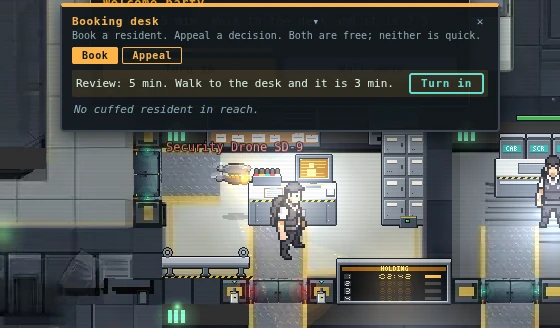
- Your review, and what it is if you turn in now.
- Turn in
- The Book and Appeal tabs.
- The booking desk.
- SD-9, amber: watching.
- The Holding wall clock.
SF-813: Serve a review
- Stay in your place. The clock runs while you are online, aboard, alive and in your cell or on the bench.
- Or work the PIP room (SF-814) to take time off.
- Wait out the rest. At zero you are moved to the office floor in front of the desk, and your kit comes back. Your strikes stay for the shift.
A review is never longer than 60 minutes, however much is stacked on it. A booking with grounds but no review time yet (you were tagged and nothing more) is a 2-minute review.
SF-814: Work the PIP room
- Stand inside your cell at the door (or next to the overflow bench) and press E: PIP room. You are walked to the sorting bench. You cannot open its door on foot; a held player never does.
- The tray opens. Sorting tray. “Put each bit in its bin. The bins are labelled. The bits are not.” A tray is 6 bits and has at least one cable, one screw and one connector.
- Drag each bit to its bin: Cables, Screws or Connectors. Or click a bit and then a bin.
- Press Submit tray. It must be at least 3 seconds after the tray was dealt, and you must be within 2 tiles of the bench.
- Read the result. A right tray: “Tray correct. sec seconds off your review.” A wrong one: “Tray incorrect. n bits in the wrong bin. No time off.” A fresh tray follows either way.
- Go back to your cell with Back to cell when you are done. The clock ran in the PIP room too.
Each right tray takes 20 seconds off. The total is capped at 50 % of the review as it was booked. At the cap: “Tray correct. Your review is as short as this programme can make it.” Sorting carries on past it; the trays still feed the chute.
Right trays feed the parts chute: every 3 right trays, counted across everyone in Holding, send one fuse to the Station’s parts shelf, up to 10 a shift. Nobody is paid for them. “Parts chute: one part sent to the shelf. Your work is appreciated, anonymously.”
Door sign: “Performance Improvement. Voluntary.” “(The word "voluntary" has been reviewed.)”
- The IN REVIEW banner and its clock.
- This tray, and the time off so far.
- The bits. Click one, then a bin, or drag it.
- The three bins.
- Submit tray (right) and Back to cell (left).
SF-815: Appeal a storm review
- Check it is a storm review. The Appeal tab on the booking desk lists only reviews SD-9 opened during a firmware storm. Anything else: “That review stands. Appeals are only for firmware errors.”
- Walk to the booking desk and open the Appeal tab.
- Press Appeal on the row. Anyone may file for anyone online.
- The review closes at once. The kit comes back, the PA says so, and the person who was booked is paid 20 gold before level scaling: “Review closed. gold gold for the trouble. SD-9 apologises in writing.”
SD-9, on an upheld appeal: “Appeal upheld. The error has been filed under "weather".”
SF-816: Take the Officer implant
- Go to an implant terminal and choose Officer. (The terminal is in Engineering, The implant.) You can change implants once every 60 seconds.
- Confirm. “Install the Officer implant? You will follow the same rules as everyone else.”
- Read what you now have. The Security doors open for you, and the booking desk lets you book.
SF-817: Cuff and book
- Find grounds. The person must be tagged, have a pending review, or be an escapee. Otherwise: “No grounds. name is not tagged, wanted or pending.”
- Get within 2 tiles and hold E on them for 2 seconds. Cuffing... One prisoner at a time.
- Walk them to the booking desk. They are kept within 3 tiles behind you, slowed, and cannot attack, use items or use the teleporter.
- At the desk, open the Book tab and press Book. The prisoner must be within 3 tiles of you, and you within 2 of the desk.
- Read the pay: “Booked. xp XP, gold gold. Thank you for your service. It is on file.” The base is 16 XP and 12 gold, scaled by your level.
The leash breaks if you go down, leave the Station, log out, drop it, or stay more than 6 tiles away for 3 seconds. The cuffs then fall off 20 seconds later, or 3 minutes after cuffing if nobody has booked the prisoner.
SF-818: Take a Detain order
- Open DISPATCH. Every player aboard with a pending review or an escape, and not in Holding or on a leash, is a Detain row: “Pending review, last seen in room. Cuff and book.”
- Claim it. You can hold 2 at a time. A claim lasts 5 minutes; claim it again to refresh it. “Order claimed. name, room.”
- Cuff and book them (SF-817). A booking that serves your own claimed order adds 50 % to the gold.
A row that disappears (the person left, was cleared, or was booked by someone else) lapses your claim: “Order lapsed. The paperwork moved on.”
SF-819: Leave Holding without clearance
- Get a second player. The cell door’s panel is on the hall side, so in practice someone has to be in the hall.
- They open the cell door’s panel and pull its access jumper (see Engineering, SF-418). The door then opens for anyone.
- Step out and stay out for 1.5 seconds. That is an escape. The PA says so: “Attention. A resident has left Holding without clearance. All Security staff, please attend.”
The cost is in Decisions. The panel log names whoever pulls the jumper: “The panel log names whoever touches it.”
Decisions
What a hit costs
Aboard, a hit does a share of the victim’s max HP, capped, whatever level either of you is. A level 292 and a level 10 need the same number of wrench hits to drop the same player.
| Hit | Share of max HP | Cap |
|---|---|---|
| Fist (no weapon) | 3 % | 10 |
| Tool (wrench, nail gun, taser) | 5 % | 15 |
| Improvised (pipe) | 6 % | 18 |
| Gadget | 4 % | 15 |
| Chemical | 4 % | 15 |
So aboard, level buys you nothing against a player. Ice shells and damage resistance still reduce the share. Off the Station, monsters and hazards are unchanged.
One tag covers a fight
Hit someone while you are already tagged and it refreshes the tag and adds that victim to it, but it is the same offence: no new strike. A brawl inside 30 seconds is one strike, not six. The price is that everyone aboard may hit you back for free the whole time, and a tag that keeps refreshing never fades.
The first one is a warning
Strike 1 books nothing. Once a shift you can hit someone, take the warning, and stop. The second strike is the one that costs a review. Strikes reset when the shift ends, so a long shift is a long record and a fresh one is a clean slate: “Fresh shift. Your strikes have been cleared.”
Who you can hit for free
- Anyone who hit you in the last 30 seconds.
- Anyone who is tagged. This is the bystander case: you did not have to be the victim.
- Anyone who is an escapee.
Killing a tagged aggressor is free as well.
A kill the game pays for, made as the aggressor, adds 5 minutes to your review on top of the ladder, at once: “Paid kill as aggressor. Review extended.” A kill that pays nothing keeps the tag and adds no time.
Turn in, or wait to be hunted
A pending review is a debt you can pay at half price or leave to SD-9.
| Turn in | Wait | |
|---|---|---|
| Review | 50 % of its length | All of it |
| Who decides when | You | SD-9, which hunts anyone aboard and alive with a pending review |
| Your freedom meanwhile | Yours until you walk in | SD-9 will find you; it goes through shut doors |
| The record | The PA: “A resident has self-reported. HR commends the honesty.” | Cuffs, escort, a booking |
You cannot step out of it. A pending review blocks the teleporter (“Your review is still open.”), so there is no leaving the Station to wait it out. Log out and the review stays; log in and SD-9 greets you with a 60-second grace in which it only watches and you can still turn in at half. After the grace: “The grace period has ended. This is the part where I become less pleasant.”
The bed rule
SD-9 never cuffs a player on a patient bed. It waits outside the medic lab door (“Patient in treatment. I will wait. I am very good at it.”) and resumes when you get up (“Treatment complete. So is my patience.”). A bed delays the cuffs; it does not cancel the review.
Weighing the PIP room
Trays take off at most 50 % of the review as it was booked. Turn in first and the booked review is already halved, so the cap is 50 % of the halved figure, not of the original: the two stack, and the PIP room never takes more than half of what you are actually serving. A wrong tray costs only the time it took: it gives nothing and deals a fresh one.
Breaking out
An escape costs more than the review you were serving. You become an escapee: wanted, with what was left of your review plus 5 minutes. Hits on you are free for everyone. SD-9 hunts you (“A resident has left Holding without clearance. This is a new form. I love new forms.”). Your kit stays in the evidence locker. Book yourself again and you serve the escape time.
An escapee’s flag lapses after 24 hours; the kit still in the locker is then posted to your mailbox.
The person who opens the door does it with a panel whose log carries their name. An escape is a thing two players do.
A storm review
Each firmware storm rolls once: 35 % of the time, SD-9 comes for the victim of the most recent tag instead of the aggressor. The lamp is purple for the whole storm. The victim can be appealed out (SF-815), and anyone may file it. The aggressor is still hunted afterwards. A storm can lose you a minute; it does not clear a record.
As an officer
- You have the same rules as everyone. An officer’s own strike 2 in a shift suspends the badge until the shift ends: “Badge on the desk. Your officer implant is suspended until the shift ends.” The PA says so too.
- A prisoner pays a booking at most once every 15 minutes: “That person was booked recently. Quality over quantity.”
- Cuffs need grounds. A tag is grounds for 30 seconds, a pending review for as long as it stands.
- The Detain order bonus is for booking the person you claimed. Booking someone else’s gets the base pay.
Chemicals and the Station
A chemical that hurts another player aboard tags and strikes like any hit (see Chemistry, Aboard the Station). Thrown and sprayed products are the kit that goes into the locker.
Who’s watching
- SD-9. It hunts every player aboard and alive with a pending review or an escape, and the lamp tells you how it feels about it.
- The PA. A review opening, a review served, a self-report, a breakout, an appeal, a suspended badge and a fresh shift each get a line. It names no one.
- The wall clock in Holding shows every cell’s remaining time.
- The board in the office lists who is in Holding.
- The panel logs. Every door panel names whoever touched it (Engineering), and the cell doors are no exception.
- The record is per shift. Strikes reset at the shift boundary; pending reviews do not.
Bring
| Bring | Why | Checked |
|---|---|---|
| Nothing in your pockets that you will miss | Thrown and sprayed chemistry products go to the locker when you are booked | |
| The Officer implant, if you want to cuff | It is fitted at the implant terminal (Engineering); a suspended badge refuses everything | |
| A friend, if you plan to leave | A cell door’s panel is on the hall side |